Forum Discussion

Fill Dashboard Table based on Criteria "OrderNumber"
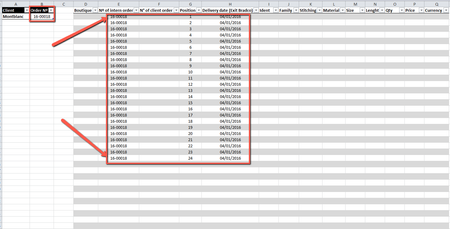

The following column headers on the Dashboard sheet do not occur on the Montblanc sheet, so code to copy data will fail.
N° of client order
Position
Delivery date (Exit Bradco)
Qty
Price
Currency
 djvas89Feb 25, 2021Copper Contributor
That Excel is a dummy file. It's what I've been testing on.
If the columns match on either side it is possible to do?
Can you tell \ hint me on how to do it?
Thanks
- HansVogelaarFeb 25, 2021MVP
Make sure that each of the column headers in D1:Q1 on the Dashboard sheet exactly matches a column header in row 1 of the Montblanc sheet.
And the column header in B1 must also match the column on which you want to filter exactly. For example Nº of intern order.
Right-click the sheet tab.
Select 'View Code' from the context menu.
Copy the following code into the worksheet module:
Private Sub Worksheet_Change(ByVal Target As Range)
    If Not Intersect(Range("B2"), Target) Is Nothing Then
        Application.ScreenUpdating = False
        Application.EnableEvents = False
        On Error GoTo ExitHere
        Worksheets("Montblanc").UsedRange.AdvancedFilter _
            Action:=xlFilterCopy, _
            CriteriaRange:=Range("B1:B2"), _
            CopyToRange:=Range("D1:Q1")
ExitHere:
        Application.EnableEvents = True
        Application.ScreenUpdating = True
    End If
End Sub
Switch back to Excel.
Save the workbook as a macro-enabled workbook (.xlsm).
Make sure that you allow macros when you open the workbook.