Forum Discussion

FIFO formula for payments receivable
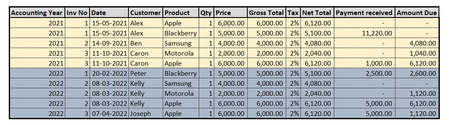
- Dec 03, 2022
MrManikandanRaju yes I already used SUMIFS so you just need to change the criteria and add another set like this:
=MIN([@[Net Total]],
   MAX(0,
   SUMIFS(Table1[[#Headers],[Net Total]]:[@[Net Total]],Table1[[#Headers],[Acc Yr]]:[@[Acc Yr]],[@[Acc Yr]],Table1[[#Headers],[Inv No]]:[@[Inv No]],[@[Inv No]])-SUMIFS([Payment Rec''d],[Acc Yr],[@[Acc Yr]],[Inv No],[@[Inv No]])))

MrManikandanRaju In the attached is an example. I used the following formula:
=MIN([@[Net Total]],
   MAX(0,
   SUMIFS(Table1[[#Headers],[Net Total]]:[@[Net Total]],Table1[[#Headers],[Customer]]:[@Customer],[@Customer])-SUMIFS([Payment Rec''d],[Customer],[@Customer])))
I formatted the data as a TABLE so I could use table references.
Line 1 just says use the min between this line's Net Total and the following calculation (i.e. max value for amount due on this line is the Net Total of this line)
Line 2 says use the max between 0 and the following calculation (i.e. don't use negative values)
Line 3 is where it takes the sum of all Net Total values from the header down to this line if the customer is this line's customer, and then subtract ALL payments by this customer.
 MrManikandanRajuDec 03, 2022Copper ContributorHi Matt. Thank you so much for the help. Appreciate it. In your example you have chosen the criteria as customer name. But I have to have the criteria as both invoice number and accounting year. I think it can be done within SUMIFS function. Please correct me if I am wrong. Let me also try it and let you know. Once again thanks!!
- mtarlerDec 03, 2022Silver Contributor
MrManikandanRaju yes I already used SUMIFS so you just need to change the criteria and add another set like this:
=MIN([@[Net Total]], MAX(0, SUMIFS(Table1[[#Headers],[Net Total]]:[@[Net Total]],Table1[[#Headers],[Acc Yr]]:[@[Acc Yr]],[@[Acc Yr]],Table1[[#Headers],[Inv No]]:[@[Inv No]],[@[Inv No]])-SUMIFS([Payment Rec''d],[Acc Yr],[@[Acc Yr]],[Inv No],[@[Inv No]])))- MrManikandanRajuDec 04, 2022Copper Contributor
mtarler This works if the data is a table. Also works only when each line item's total is mentioned in Net Total column.
However it is not working when I group the net total by invoice. Why is it so?
I can convert my data into table. No big deal. But why the formula is not working when I group the net total by invoice?
Attaching sample workbook.
Please help.