Forum Discussion

Excel Vlookup Error
 Jul 22, 2022
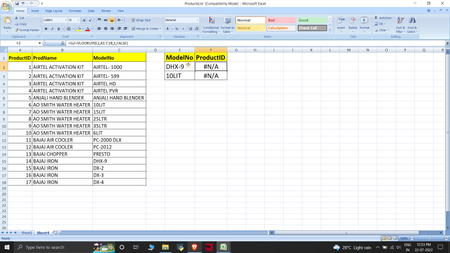
=INDEX($B$2:$B$8,MATCH(E2,$C$2:$C$8,0))You can do this with INDEX and MATCH.
=VLOOKUP(E2,CHOOSE({1,2},$C$2:$C$8,$B$2:$B$8),2,0)This is the alternative with VLOOKUP. Enter this formula with ctrl+shift+enter if you don't work with Office365 or 2021.
If you work with Office365 or 2021 you can use XLOOKUP.

OliverScheurich thanks allotted it work for me. Just explain to me why we need to write choose function?
VLOOKUP (without another formula) only returns values from a range to the right. For example you can look up a value in column B and return a value from column C or D or E... This is because columns C, D and E are on the right side of column B.
In your example the return column B is on the left side of the lookup column C. VLOOKUP without another formula can't do this. However it's possible to combine VLOOKUP and CHOOSE. With CHOOSE it's possible to define the lookup range and the return range.
Generally if the return range is on the left of the search range INDEX and MATCH are applied or XLOOKUP when working with Office365 or 2021.
- Shaqibiqbal007Jul 22, 2022Tin ContributorThanks for your kind help