Forum Discussion

Excel VBA
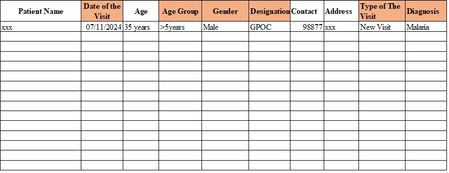

If you need the solution to be fully automated without manual intervention, then VBA is the most flexible option. However, if you’re ok with some manual setup, a Pivot Table or COUNTIFS formulas could work just as well, please try this coding solution:
Insert a new module and paste the following code:
==========================================
Sub GenerateReport()
Dim wsDatabase As Worksheet, wsReport As Worksheet
Dim lastRow As Long, i As Long
Dim startDate As Date, endDate As Date
Dim diagnosis As String, designation As String
Dim ageGroup As String, visitType As String
Dim cellToUpdate As Range
' Define the sheets
Set wsDatabase = ThisWorkbook.Sheets("Database")
Set wsReport = ThisWorkbook.Sheets("Reports")
' Set start and end date from "Reports" sheet (e.g., cells B2 and C2)
startDate = wsReport.Range("B2").Value
endDate = wsReport.Range("C2").Value
' Find the last row of data in the "Database" sheet
lastRow = wsDatabase.Cells(wsDatabase.Rows.Count, 1).End(xlUp).Row
' Loop through each row in the "Database" sheet
For i = 2 To lastRow ' Assuming row 1 has headers
' Check if the date is within the specified range
If wsDatabase.Cells(i, 2).Value >= startDate And wsDatabase.Cells(i, 2).Value <= endDate Then
' Get the criteria values
diagnosis = wsDatabase.Cells(i, 10).Value ' Adjust column number for Diagnosis
designation = wsDatabase.Cells(i, 6).Value ' Adjust column number for Designation
ageGroup = wsDatabase.Cells(i, 4).Value ' Adjust column number for Age Group
visitType = wsDatabase.Cells(i, 8).Value ' Adjust column number for Visit Type
' Find the cell in the "Reports" sheet to update based on criteria
Set cellToUpdate = FindReportCell(wsReport, diagnosis, designation, ageGroup, visitType)
' If cell is found, add 1 to it
If Not cellToUpdate Is Nothing Then
cellToUpdate.Value = cellToUpdate.Value + 1
End If
End If
Next i
MsgBox "Report generated successfully!", vbInformation
End Sub
Function FindReportCell(ws As Worksheet, diagnosis As String, designation As String, ageGroup As String, visitType As String) As Range
Dim row As Long, col As Long
' Find row based on Diagnosis in "Reports" sheet
Select Case diagnosis
Case "Malaria": row = 5
Case "URTI/URTI": row = 6
' Add cases for other diagnoses here
' ...
End Select
' Find column based on Designation, Age Group, and Visit Type
Select Case designation
Case "GPOC"
If ageGroup = ">5 years" Then
If visitType = "New Visit" Then col = 3
If visitType = "Re-Visit" Then col = 4
End If
Case "Non-GPOC"
If ageGroup = "<5 years" Then
If visitType = "New Visit" Then col = 5
If visitType = "Re-Visit" Then col = 6
End If
' Add more cases as needed for other categories
' ...
End Select
' Return the cell reference
If row > 0 And col > 0 Then
Set FindReportCell = ws.Cells(row, col)
Else
Set FindReportCell = Nothing
End If
End Function
==================================
After pasting the code, close the VBA editor.
In the "Reports" sheet, set the start and end dates in cells B2 and C2, respectively.
Press Alt + F8 in Excel, select GenerateReport, and click "Run."
 AkwangdiingNov 08, 2024Tin Contributor
much thanks for the effort ,but you forgot to add gender as criteria
i have modified it but its giving this error " End Select without select case"
Sub GenerateReport()
Dim wsDatabase As Worksheet, wsReport As Worksheet
Dim lastRow As Long, i As Long
Dim startDate As Date, endDate As Date
Dim diagnosis As String, designation As String
Dim ageGroup As String, visitType As String
Dim Gender As String
Dim cellToUpdate As Range
' Define the sheets
Set wsDatabase = ThisWorkbook.Sheets("Database")
Set wsReport = ThisWorkbook.Sheets("Reports")
' Set start and end date from "Reports" sheet (e.g., cells B2 and C2)
startDate = wsReport.Range("R4").Value
endDate = wsReport.Range("T4").Value
' Find the last row of data in the "Database" sheet
lastRow = wsDatabase.Cells(wsDatabase.Rows.Count, 1).End(xlUp).row
' Loop through each row in the "Database" sheet
For i = 7 To lastRow ' Assuming row 1 has headers
' Check if the date is within the specified range
If wsDatabase.Cells(i, 2).Value >= startDate And wsDatabase.Cells(i, 2).Value <= endDate Then
' Get the criteria values
diagnosis = wsDatabase.Cells(i, 16).Value ' Adjust column number for Diagnosis
Gender = wsDatabase.Cells(i, 5).Value ' Adjust column number for Designation
designation = wsDatabase.Cells(i, 6).Value ' Adjust column number for Designation
ageGroup = wsDatabase.Cells(i, 4).Value ' Adjust column number for Age Group
visitType = wsDatabase.Cells(i, 11).Value ' Adjust column number for Visit Type
' Find the cell in the "Reports" sheet to update based on criteria
Set cellToUpdate = FindReportCell(wsReport, diagnosis, Gender, designation, ageGroup, visitType)
' If cell is found, add 1 to it
If Not cellToUpdate Is Nothing Then
cellToUpdate.Value = cellToUpdate.Value + 1
End If
End If
Next i
MsgBox "Report generated successfully!", vbInformation
End SubFunction FindReportCell(ws As Worksheet, Gender As String, diagnosis As String, designation As String, ageGroup As String, visitType As String) As Range
Dim row As Long, col As Long
' Find row based on Diagnosis in "Reports" sheet
Select Case diagnosis
Case "Malaria": row = 7
Case "URTI/URTI": row = 8
Case "Typhoid Fever": row = 9
Case "AWD": row = 10
Case "Dysentery": row = 11
Case "Skin disease": row = 12
Case "Eye disease": row = 13
Case "STDs": row = 14
Case "UTI": row = 15
Case "Tuberculosis (suspected)": row = 16
Case "Cholera": row = 17
Case "Meningitis (suspected)": row = 18
Case "Suspect COVID-19": row = 19
Case "Asthma": row = 20
Case "PUD": row = 21
Case "Arthritis": row = 22
Case "Hypertension": row = 23
Case "Diabetes ": row = 24
Case "Injuries and Trauma": row = 25
Case "Burn": row = 26
Case "CO Poisoning ": row = 26
Case "Others ": row = 26
' Add cases for other diagnoses here
' ...
End Select
' Find column based on Designation,Gender, Age Group, and Visit Type
Select Case designation
Case "GPOC"
If ageGroup = ">=5 years" & Gender = "Male" Then
If visitType = "New Visit" Then col = 3
If visitType = "Re-Visit" Then col = 5
ElseIf ageGroup = ">5 years" & Gender = "Female" Then
If visitType = "New Visit" Then col = 4
If visitType = "Re-Visit" Then col = 6
End If
If ageGroup = ">=5 years" & Gender = "Male" Then
If visitType = "New Visit" Then col = 7
If visitType = "Re-Visit" Then col = 11
ElseIf ageGroup = ">=5 years" & Gender = "Female" Then
If visitType = "New Visit" Then col = 8
If visitType = "Re-Visit" Then col = 12
If ageGroup = "<5 years" Then
If visitType = "New Visit" Then col = 9
If visitType = "Re-Visit" Then col = 13
ElseIf ageGroup = "<5 years" & Gender = "Female" Then
If visitType = "New Visit" Then col = 10
If visitType = "Re-Visit" Then col = 14
End If
' Add more cases as needed for other categories
' ...
End Select
' Return the cell reference
If row > 0 And col > 0 Then
Set FindReportCell = ws.Cells(row, col)
Else
Set FindReportCell = Nothing
End If
End Function- Mks_1973Nov 08, 2024Iron Contributor
the problem area in the FindReportCell function where the error End Select without Select Case occurred due to incorrect syntax in the Select Case structure and If blocks.
Below is the corrected portion of that function:
Function FindReportCell(ws As Worksheet, diagnosis As String, Gender As String, designation As String, ageGroup As String, visitType As String) As Range
Dim row As Long, col As Long
' Find row based on Diagnosis in "Reports" sheet
Select Case diagnosis
Case "Malaria": row = 7
Case "URTI/URTI": row = 8
Case "Typhoid Fever": row = 9
Case "AWD": row = 10
Case "Dysentery": row = 11
Case "Skin disease": row = 12
Case "Eye disease": row = 13
Case "STDs": row = 14
Case "UTI": row = 15
Case "Tuberculosis (suspected)": row = 16
Case "Cholera": row = 17
Case "Meningitis (suspected)": row = 18
Case "Suspect COVID-19": row = 19
Case "Asthma": row = 20
Case "PUD": row = 21
Case "Arthritis": row = 22
Case "Hypertension": row = 23
Case "Diabetes": row = 24
Case "Injuries and Trauma": row = 25
Case "Burn": row = 26
Case "CO Poisoning": row = 27
Case "Others": row = 28
' Add cases for other diagnoses here if necessary
End Select
' Find column based on Designation, Gender, Age Group, and Visit Type
Select Case designation
Case "GPOC"
If ageGroup = ">=5 years" And Gender = "Male" Then
If visitType = "New Visit" Then col = 3
If visitType = "Re-Visit" Then col = 5
ElseIf ageGroup = ">=5 years" And Gender = "Female" Then
If visitType = "New Visit" Then col = 4
If visitType = "Re-Visit" Then col = 6
End If
Case "Non-GPOC"
If ageGroup = "<5 years" And Gender = "Male" Then
If visitType = "New Visit" Then col = 7
If visitType = "Re-Visit" Then col = 9
ElseIf ageGroup = "<5 years" And Gender = "Female" Then
If visitType = "New Visit" Then col = 8
If visitType = "Re-Visit" Then col = 10
End If
' Add more cases as needed for other categories
End Select
' Return the cell reference
If row > 0 And col > 0 Then
Set FindReportCell = ws.Cells(row, col)
Else
Set FindReportCell = Nothing
End If
End Function
This should resolve the error and ensure that the correct cells are referenced based on the criteria- AkwangdiingNov 09, 2024Tin Contributor
When I press "Generate Report" , msgbox popup saying "Report has been updated "
but no data inside the report table
- AkwangdiingNov 08, 2024Tin Contributor
this is a sample of what it look like , please take a look and let me know what you think