Forum Discussion

Shipwreck818
Sep 24, 2023Copper Contributor
Excel, unbale to get a VBA macro working to hide rows
Hello everyone I can relaly use some help as my VBA macro abilities still need more practice. I have the tennis elbow to prove it becuase I am in pain. My project consists 7 Primary Funcito...
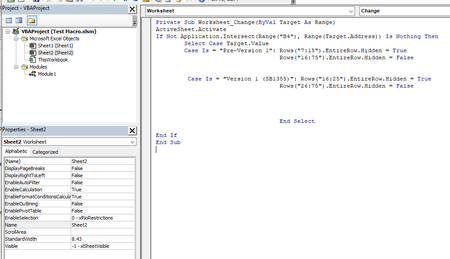
- Sep 25, 2023
See the attached version.
If the end date is left blank, it will work as before.
If you enter an end date, ALL sections that overlap the period from start date to end date will be displayed.
The formulas now use Sheet3. I left Sheet1 in the workbook, but it is not used anymore.

James818
Sep 26, 2023Brass Contributor
I made no changes to the sheet you last provided. I re downloaded here at my office. Technically all that would be needed is B5:B11 as there is only 7 versions required. I created another excel sheet, tweaking it to columns not rows. Everything worked flawlessly at home.

HansVogelaar
Sep 26, 2023MVP
Do B5, B6 etc. populate with the appropriate versions?
- Shipwreck818Oct 02, 2023Copper ContributorThank you.
- HansVogelaarOct 02, 2023MVP
Good to hear that it has been solved.
- Shipwreck818Oct 02, 2023Copper ContributorI just got it working, seemed our in office comuters never got updated properly. Took a good hour to update and everythign runs fine now. My appologies for this frustration, but when it comes to part time telworking this is a new double edge sword issue we face in my workplace.
- HansVogelaarSep 26, 2023MVP
OK, but B5:B11 are populated correctly. I have no idea why the error occurs, since you use Microsoft 365 it should work. Sorry.
- James818Sep 26, 2023Brass Contributor
