Forum Discussion

Excel Tables - Table Data based on Another Table
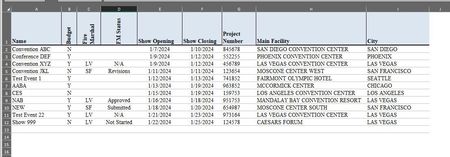

mathetes definitely understand. here is an example, if something doesnt make sense, let me know and i will try to explain it better.
https://docs.google.com/spreadsheets/d/1Nvp2TE9HDvIWgKZ6q_Lw4lqCWOG-0wvm/edit?usp=sharing&ouid=103253656502323059392&rtpof=true&sd=true
thanks

That link takes me to google, but it doesn't grant access. You need to create a different kind of link.
- brianlvDec 14, 2023Copper Contributori updated the access levels for the link. should be able to open it now. i didnt realize it wouldnt allow access if i provided the direct link.
thanks,- mathetesDec 14, 2023Gold Contributor
Mixing Input and Output on single sheets, especially when they're essentially the same kinds of lists, and unavoidably when you're expecting (miraculously) that each will update the other, just makes for trouble.
I would strongly suggest that you make Input (or "RawData") a sheet of its own, and do ALL input on that sheet. Then have either:
- a single "dynamic" output sheet, where you can select any given city from the rawData sheet, and get a display of all the data for that city, or
- individual sheets for each city displaying the data for that city.
See the attached example.