Forum Discussion

Excel Status bar SUM bug?
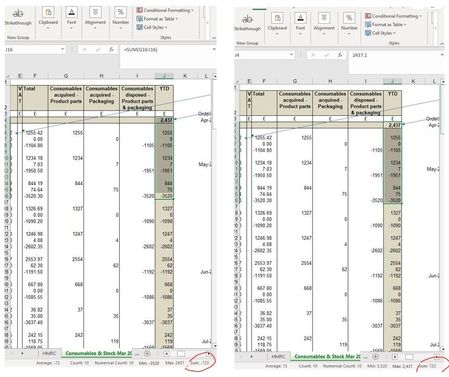
- Feb 28, 2023Hello
It'ss the format of the active cell that is used for display in the status bar => Change it for J4


here you go https://1drv.ms/x/s!Aqv-iRI_od-2gs9JwZQm0wh_W0fICw
- HecatonchireFeb 28, 2023Iron ContributorHello
It'ss the format of the active cell that is used for display in the status bar => Change it for J4- L1ANEFeb 28, 2023Copper Contributorthank you! I can't imagine why it's formatted that way, or why the format of that cell should affect the status bar, but it does!
 JoeUser2004Feb 28, 2023Bronze Contributor
Hecatonchire wrote: ``It'ss the format of the active cell that is used for display in the status bar``
Excellent find! Easy to duplicate -- even in Excel 2010.
Fill A1:A10 with -1 formatted as General. But format A10 as Custom 0;0 (missing minus sign on purpose).
Select A1 to A10 (i.e. A1 is the active cell), and the status bar sum is -10, as expected.
But select A10 to A1 (i.e. A10 is the active cell), and the status bar sum appears to be 10 (positive).
-----
L1ANE wrote: ``I can't imagine [...] why the format of that cell should affect the status bar``
I agree that it can be a surprise. But having had it explained, it makes good sense in general, IMHO.
Certainly, we would like the status bar sum to reflect the format of the data. If all of the data is currency, the sum should appear to be the same currency. If all of the data is time, the sum should appear to be time. If all of the data is percentage, the sum should appear to be percentage. Etc.
But what format should the status bar choose if not all of the data is the same format?
I believe there are two reasonable choices: (1) a default format (probably General); or (2) the active cell.
I'm happy with the latter, especially if the data is time or a custom format like[<1000]0;[<1000000]0,\K;0,,\MApparently MSFT chose the latter. (My opinion does not matter.)
- JKPieterseFeb 28, 2023Silver ContributorStrange behaviour. At first it looked as if it did not repro in Desktop Excel, but does in Excel online. But if I change the selection, making sure the negative cell is active I do get a negative sum.
Not good at all! Please use Help, Feedback, I don't like something to report this bug- HecatonchireFeb 28, 2023Iron Contributor
An exemple :