Forum Discussion

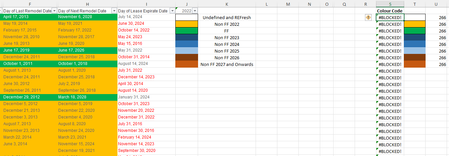
Excel Showing #blocked! after sorting
 Feb 08, 2022
It appears there was a recent update to disable xlm macro functions. But, it also appears there is a trust center setting for it, unless your organization has restricted it.
https://techcommunity.microsoft.com/t5/excel-blog/excel-4-0-xlm-macros-now-restricted-by-default-for-customer/ba-p/3057905Alternatively, you might try a custom function, copy the code into a standard module in the vba editor. Then, use it like an excel function =GetColorIndex(A1) or just GetColorIndex() to return the value of the cell in which the function is entered.
Public Function GetColorIndex(Optional rng As Range) As Variant
     Dim cell As Range


     On Error GoTo ErrHandler

     Application.Volatile True

     If rng Is Nothing Then
          If TypeName(Application.Caller) = "Range" Then
               Set cell = Application.Caller
          Else
               Err.Raise Number:=vbObjectError + 513
          End If
     Else
          Set cell = rng.Cells(1)
     End If

     GetColorIndex = cell.Interior.ColorIndex


ExitProc:
     Exit Function

ErrHandler:
     GetColorIndex = CVErr(xlErrValue)

End Function
It appears there was a recent update to disable xlm macro functions. But, it also appears there is a trust center setting for it, unless your organization has restricted it.
https://techcommunity.microsoft.com/t5/excel-blog/excel-4-0-xlm-macros-now-restricted-by-default-for-customer/ba-p/3057905
Alternatively, you might try a custom function, copy the code into a standard module in the vba editor. Then, use it like an excel function =GetColorIndex(A1) or just GetColorIndex() to return the value of the cell in which the function is entered.
Public Function GetColorIndex(Optional rng As Range) As Variant
     Dim cell As Range


     On Error GoTo ErrHandler

     Application.Volatile True

     If rng Is Nothing Then
          If TypeName(Application.Caller) = "Range" Then
               Set cell = Application.Caller
          Else
               Err.Raise Number:=vbObjectError + 513
          End If
     Else
          Set cell = rng.Cells(1)
     End If

     GetColorIndex = cell.Interior.ColorIndex


ExitProc:
     Exit Function

ErrHandler:
     GetColorIndex = CVErr(xlErrValue)

End Function
 Michaelkoh89Feb 15, 2022Copper ContributorThanks very much. I managed to open the VBA editor and put the code in. Now it shows correctly.