Forum Discussion

Rustyebu
Jan 28, 2025Copper Contributor
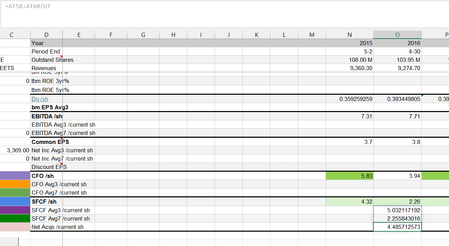
Excel keeps pasting the formula below and beside depending on whether I press enter or tab
Like I said in the title, when I try to calculate a formula by pressing enter or tab, excel applies the formula to the two rows below or beside the anchor cell. I don't know why this is happening, wh...

insightsgeek
Jan 28, 2025Brass Contributor
RustyebuI have a few solutions in mind for this issue.
What you’re describing sounds like Excel’s AutoFill or Array Formula behaviour, likely caused by Implicit Column or Row Expansion due to Spill Formula Behaviour in newer versions of Excel (Excel 365 or Excel 2019+). Excel automatically tries to "spill" the results into adjacent blank cells. This usually happens with formulas that return multiple values like your "AT58:AT60/O7".
1) Try to hit Ctrl+Enter to force the formula to stay in the selected cell.
2) Add @ before the formula to force Excel to consider it as a scalar value.
3) Check if It’s a Table Issue and disable auto-fill: File > Options > Formulas