Forum Discussion

Excel Journal Entry Automation
- May 29, 2025
unfortunately it requires a login:
but the good news is that it does appear you have excel 365 since it isn't giving a name? error.
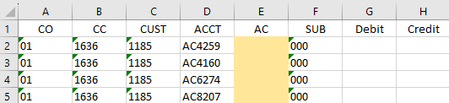
I also wanted to ask what that 'Sub' column was for since it is 000 in each case (at least in the example). It might be easier if we could make a single formula to spill all 3 columns (or all 4 and include the 'Sub' column)
EDIT: I think I found the issue. In my sample I have the CC column as numbers which match the numbers in row 1 of the Activity retrieve sheet. But I think you have them as TEXT. if you convert those text values to numbers or vice versa the numbers to text it should work. Alternatively we can update the formulas to force both to text (or numbers):
column E:
=MID(FILTER('Activity retrieve'!D:D, ('Activity retrieve'!B:B=Sheet2!D2)*(N(CHOOSECOLS('Activity retrieve'!F:J,XMATCH(Sheet2!B2&"",'Activity retrieve'!$F$1:$J$1&"")))<>0),""),3,9)column G:
=IF(E2="","",LET(c,CHOOSECOLS('Activity retrieve'!F:J,XMATCH(Sheet2!B2&"",'Activity retrieve'!$F$1:$J$1&"")),o,FILTER(c, ('Activity retrieve'!B:B=Sheet2!D2)*(N(c)<>0),""), q,-12,p,CHOOSE(SIGN(o)+2,HSTACK("",-o),{"",""},HSTACK(o,"")),p))in the updated attached file I include these formulas and also a version that has all 4 columns spill:
=LET(c,CHOOSECOLS('Activity retrieve'!F:J,XMATCH(Sheet2!B10&"",'Activity retrieve'!$F$1:$J$1&"")),
r,XMATCH(1,('Activity retrieve'!B:B=Sheet2!D10)*(N(c)<>0)),
ac,MID(INDEX('Activity retrieve'!D:D,r),3,9),
v,INDEX(c,r),
p,CHOOSE(IFNA(SIGN(v)+2,2),HSTACK(ac,"000","",-v),{"","000","",""},HSTACK(ac,"000",v,"")),
p)
so it first picks the column,
then finds the row (r)
based on the row it finds the AC and the value (v)
then p just creates the 4 cell output.
this could also be wrapped into a larger LAMBDA using either stacking in a REDUCE function or using THUNKS but for now lets just get this part working


How about this:
For Column E:
=IFERROR(INDEX('Activity retrieve'!D:D, MATCH(1, ('Activity retrieve'!B:B=B4) * ('Activity retrieve'!F:F<>0), 0)), "")
For Column G:
=IF(E4<>"", IF('Activity retrieve'!F24>0, 'Activity retrieve'!F24, ""))
For Column H:
=IF(E4<>"", IF('Activity retrieve'!F24<0, ABS('Activity retrieve'!F24), ""))

Hi Kidd_Ip I attempted this solution and it didn't seem to get quite what I was looking for. Column E seems to return nothing and G&H display false. Below is the picture of the result and formulas I used for row 4.
Column E:
=IFERROR(INDEX('Activity retrieve'!D:D, MATCH(1, ('Activity retrieve'!B:B=B4) * ('Activity retrieve'!F:F<>0), 0)), "")Column G:
=IF(E4<>"", IF('Activity retrieve'!F24>0, 'Activity retrieve'!F24, ""))Column H:
=IF(E4<>"", IF('Activity retrieve'!F24<0, ABS('Activity retrieve'!F24), ""))
Thank you for your reply!