Forum Discussion

Excel Journal Entry Automation
- May 29, 2025
unfortunately it requires a login:
but the good news is that it does appear you have excel 365 since it isn't giving a name? error.
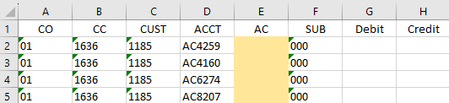
I also wanted to ask what that 'Sub' column was for since it is 000 in each case (at least in the example). It might be easier if we could make a single formula to spill all 3 columns (or all 4 and include the 'Sub' column)
EDIT: I think I found the issue. In my sample I have the CC column as numbers which match the numbers in row 1 of the Activity retrieve sheet. But I think you have them as TEXT. if you convert those text values to numbers or vice versa the numbers to text it should work. Alternatively we can update the formulas to force both to text (or numbers):
column E:
=MID(FILTER('Activity retrieve'!D:D, ('Activity retrieve'!B:B=Sheet2!D2)*(N(CHOOSECOLS('Activity retrieve'!F:J,XMATCH(Sheet2!B2&"",'Activity retrieve'!$F$1:$J$1&"")))<>0),""),3,9)column G:
=IF(E2="","",LET(c,CHOOSECOLS('Activity retrieve'!F:J,XMATCH(Sheet2!B2&"",'Activity retrieve'!$F$1:$J$1&"")),o,FILTER(c, ('Activity retrieve'!B:B=Sheet2!D2)*(N(c)<>0),""), q,-12,p,CHOOSE(SIGN(o)+2,HSTACK("",-o),{"",""},HSTACK(o,"")),p))in the updated attached file I include these formulas and also a version that has all 4 columns spill:
=LET(c,CHOOSECOLS('Activity retrieve'!F:J,XMATCH(Sheet2!B10&"",'Activity retrieve'!$F$1:$J$1&"")),
r,XMATCH(1,('Activity retrieve'!B:B=Sheet2!D10)*(N(c)<>0)),
ac,MID(INDEX('Activity retrieve'!D:D,r),3,9),
v,INDEX(c,r),
p,CHOOSE(IFNA(SIGN(v)+2,2),HSTACK(ac,"000","",-v),{"","000","",""},HSTACK(ac,"000",v,"")),
p)
so it first picks the column,
then finds the row (r)
based on the row it finds the AC and the value (v)
then p just creates the 4 cell output.
this could also be wrapped into a larger LAMBDA using either stacking in a REDUCE function or using THUNKS but for now lets just get this part working

alternatively try
column E:
=MID(FILTER('Activity retrieve'!D:D, ('Activity retrieve'!B:B=Sheet2!D2)*(N(CHOOSECOLS('Activity retrieve'!F:J,XMATCH(Sheet2!B2,'Activity retrieve'!$F$1:$J$1)))<>0),""),3,9)column G:
=IF(E2="","",LET(c,CHOOSECOLS('Activity retrieve'!F:J,XMATCH(Sheet2!B2,'Activity retrieve'!$F$1:$J$1)),o,FILTER(c, ('Activity retrieve'!B:B=Sheet2!D2)*(N(c)<>0),""), q,-12,p,CHOOSE(SIGN(o)+2,HSTACK("",-o),{"",""},HSTACK(o,"")),p))note this requires Excel 365 and column G will 'spill' into column H
In reviewing Kidd_Ip equations I made some corrections to automatically select which column to use and re-find the correct row for the subsequent columns but keeping what I believe will work for an old version of Excel in mind and believe the following would work in that case:
column E:
=MID(IFERROR(INDEX('Activity retrieve'!D:D, MATCH(1,('Activity retrieve'!B:B=D2)*(INDEX('Activity retrieve'!F:J, 0,MATCH(B2,'Activity retrieve'!$F$1:$J$1,0))<>0),0)),""),3,9)column G:
=IF(J2="","",IFERROR(1/(1/MAX(0,INDEX('Activity retrieve'!F:J,MATCH(1,('Activity retrieve'!B:B=D2)*(INDEX('Activity retrieve'!F:J,0,MATCH(B2,'Activity retrieve'!$F$1:$J$1,0))<>0),0),MATCH(B2,'Activity retrieve'!$F$1:$J$1,0)))),""))column H:
=IF(J2="","",IFERROR(1/(1/MAX(0,-INDEX('Activity retrieve'!F:J,MATCH(1,('Activity retrieve'!B:B=D2)*(INDEX('Activity retrieve'!F:J,0,MATCH(B2,'Activity retrieve'!$F$1:$J$1,0))<>0),0),MATCH(B2,'Activity retrieve'!$F$1:$J$1,0)))),""))
both options are in the attached file (the later 3 are in columns J,K,L)

Hi m_tarler, thank you for your help! I attempted all both strategies in different ways and I couldn't seem to get it to work for me. I even attempted copying the formulas from the excel sheet you provided while updating the tab name of Sheet2 and I was unsuccessful. I'll provide the errors for all 3 solutions with pictures and the formulas I used. I'll just provide formulas for row 4 where we'd expect an output for simplicity
The first grouping of formulas gave me #N/A errors:
Column E:
=MID(FILTER('Activity retrieve'!D:D, ('Activity retrieve'!B:B='APR-25 Unbillable Entry'!D4)*(N(CHOOSECOLS('Activity retrieve'!F:J,XMATCH('APR-25 Unbillable Entry'!B4,'Activity retrieve'!$F$1:$J$1)))<>0),""),3,9)
Column G:
=IF(E4="","",LET(c,CHOOSECOLS('Activity retrieve'!F:J,XMATCH('APR-25 Unbillable Entry'!B4,'Activity retrieve'!$F$1:$J$1)),o,FILTER(c, ('Activity retrieve'!B:B='APR-25 Unbillable Entry'!D4)*(N(c)<>0),""), q,-12,p,CHOOSE(SIGN(o)+2,HSTACK("",-o),{"",""},HSTACK(o,"")),p))
The 2nd group of suggestions for old excel didn't populate anything for column E, G, or H.
Column E:
=MID(IFERROR(INDEX('Activity retrieve'!D:D, MATCH(1,('Activity retrieve'!B:B=D4)*(INDEX('Activity retrieve'!F:J, 0,MATCH(B4,'Activity retrieve'!$F$1:$J$1,0))<>0),0)),""),3,9)Column G:
=IF(E4="","",IFERROR(1/(1/MAX(0,INDEX('Activity retrieve'!F:J,MATCH(1,('Activity retrieve'!B:B=D4)*(INDEX('Activity retrieve'!F:J,0,MATCH(B4,'Activity retrieve'!$F$1:$J$1,0))<>0),0),MATCH(B4,'Activity retrieve'!$F$1:$J$1,0)))),""))Column H:
=IF(E4="","",IFERROR(1/(1/MAX(0,-INDEX('Activity retrieve'!F:J,MATCH(1,('Activity retrieve'!B:B=D4)*(INDEX('Activity retrieve'!F:J,0,MATCH(B4,'Activity retrieve'!$F$1:$J$1,0))<>0),0),MATCH(B4,'Activity retrieve'!$F$1:$J$1,0)))),""))
Really appreciate your help once again! Really unsure what I could be incorrectly inputting to make these formulas not work. I also attempted to attached a condensed version of the workbook but not sure I have the ability to.
- m_tarlerMay 29, 2025Silver Contributor
can you provide the actual workbook (without any personal/private information)? If you can't attach it here maybe share it through a cloud service like onedrive or google.
Are you sure the sheet names are correct and that ranges are correct in the other book?
Are you also sure there will be only 1 line that will have a value for that CC & ACCT combination?
- MitchellithMay 29, 2025Copper Contributor
https://dpdhl-my.sharepoint.com/:x:/r/personal/mitchell_smith2_dhl_com/Documents/Desktop/Apr-25%20Network%20WC%20Calculation%20File%20(Condensed).xlsx?d=wed2c2668b1bb478eb7eea18339046999&csf=1&web=1&e=0iFAFY
This link should work to a condensed version of the workbook.
The sheet names are correct as far as I can tell.
There should only be one, the retrieve will consolidate entries made against the same combinations.
- m_tarlerMay 29, 2025Silver Contributor
unfortunately it requires a login:
but the good news is that it does appear you have excel 365 since it isn't giving a name? error.
I also wanted to ask what that 'Sub' column was for since it is 000 in each case (at least in the example). It might be easier if we could make a single formula to spill all 3 columns (or all 4 and include the 'Sub' column)
EDIT: I think I found the issue. In my sample I have the CC column as numbers which match the numbers in row 1 of the Activity retrieve sheet. But I think you have them as TEXT. if you convert those text values to numbers or vice versa the numbers to text it should work. Alternatively we can update the formulas to force both to text (or numbers):
column E:
=MID(FILTER('Activity retrieve'!D:D, ('Activity retrieve'!B:B=Sheet2!D2)*(N(CHOOSECOLS('Activity retrieve'!F:J,XMATCH(Sheet2!B2&"",'Activity retrieve'!$F$1:$J$1&"")))<>0),""),3,9)column G:
=IF(E2="","",LET(c,CHOOSECOLS('Activity retrieve'!F:J,XMATCH(Sheet2!B2&"",'Activity retrieve'!$F$1:$J$1&"")),o,FILTER(c, ('Activity retrieve'!B:B=Sheet2!D2)*(N(c)<>0),""), q,-12,p,CHOOSE(SIGN(o)+2,HSTACK("",-o),{"",""},HSTACK(o,"")),p))in the updated attached file I include these formulas and also a version that has all 4 columns spill:
=LET(c,CHOOSECOLS('Activity retrieve'!F:J,XMATCH(Sheet2!B10&"",'Activity retrieve'!$F$1:$J$1&"")),
r,XMATCH(1,('Activity retrieve'!B:B=Sheet2!D10)*(N(c)<>0)),
ac,MID(INDEX('Activity retrieve'!D:D,r),3,9),
v,INDEX(c,r),
p,CHOOSE(IFNA(SIGN(v)+2,2),HSTACK(ac,"000","",-v),{"","000","",""},HSTACK(ac,"000",v,"")),
p)
so it first picks the column,
then finds the row (r)
based on the row it finds the AC and the value (v)
then p just creates the 4 cell output.
this could also be wrapped into a larger LAMBDA using either stacking in a REDUCE function or using THUNKS but for now lets just get this part working