Forum Discussion

Excel Icon Help
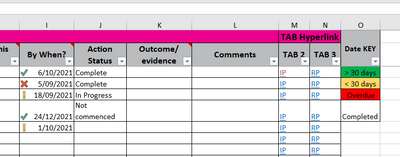
- Sep 07, 2021
Select the range in column I that you want to format.
I2 should be the active cell in the selection.
On the Home tab of the ribbon, select Conditional Formatting > Manage Rules...
Click 'New Rule...'
Select 'Use a formula to determine which cells to format'.
Enter the formula =J2="Complete"
Click OK without specifying a format.
The new rule should appear above the Icon Set rule.
Tick the check box 'Stop If True' for the new rule.
Click OK.

Select the range in column I that you want to format.
I2 should be the active cell in the selection.
On the Home tab of the ribbon, select Conditional Formatting > Manage Rules...
Click 'New Rule...'
Select 'Use a formula to determine which cells to format'.
Enter the formula =J2="Complete"
Click OK without specifying a format.
The new rule should appear above the Icon Set rule.
Tick the check box 'Stop If True' for the new rule.
Click OK.
