Forum Discussion

Excel Help
Hi
So I am creating a budget spreadsheet on Excel for myself.
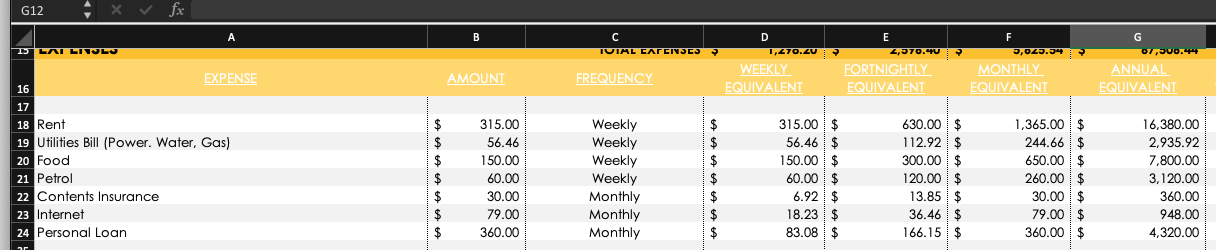
I need help with once I select the Drop down list Frequency - (Weekly,Fortnightly,Monthly,Quarterly,Annually) - Have it automatically calculate the formulas in the equivalent part using the "amount" & "frequency"
For instance - I input the information in Expense - A18 (Rent) & Amount - B18 ($315) I then use the drop down list in frequency - C18 (Weekly) and it will automatically input the calculations in D18 to G18.
I have attached a screen shot of the document example to help.
Thanks for your help!
3 Replies
- TwifooSilver Contributor
To facilitate testing of formulas, please attach your sample file. Also, please explain how you calculate the amounts for each frequency.
 renee22roxyCopper Contributor
Twifoo
I have edited the post and attached the sample file.If you see the document attached - i have a section at the bottom for the formulas,
e.g. - Fortnightly > to weekly =SUM(B36/2) > to fortnightly =SUM(B36*1) > to monthly =SUM(B36*26/12) > to Annual =SUM(B36*26)
Currently I am copying pasting the section to make it work but would prefer once i click the frequency type it automatically calculates it all.
- TwifooSilver Contributor
In the attached version of your file, the formula in D14, copied down and across the range, is:
=$B14*VLOOKUP($C14,
FrequencyTable,
MATCH(D$12,FrequencyLabels,0),0)Note that I modified the labels in Sheet1!D12:G12 to conform to the FrequencyLabels in Sheet2.