Forum Discussion

Excel: Help! Formula needed
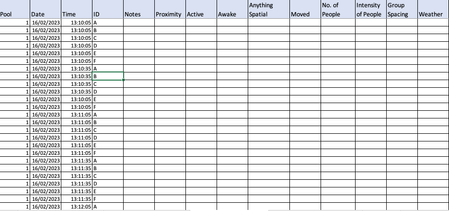

mathetes Thank you for responding to me.
So for problem A:
With my individuals, there are seals moving in and out over time which is another complexity to my data - I have individuals being added and then removed during the data collection (N=40). But I see what you are saying. I have an idea as to what I'll do to solve that problem using your method. So thank you for that!!
Problem B:
So by time pattern I mean purely the pattern within my data so for example:
| Pool | Date | Time | ID |
| 1 | 16/02/2023 | 03:57:05 | A |
| 1 | 16/02/2023 | 03:57:05 | B |
| 1 | 16/02/2023 | 03:57:05 | C |
| 1 | 16/02/2023 | 03:57:05 | D |
| 1 | 16/02/2023 | 03:57:05 | E |
| 1 | 16/02/2023 | 03:57:35 | A |
| 1 | 16/02/2023 | 03:57:35 | B |
| 1 | 16/02/2023 | 03:57:35 | C |
| 1 | 16/02/2023 | 03:57:35 | D |
| 1 | 16/02/2023 | 03:57:35 | E |
| 1 | 16/02/2023 | 03:58:05 | A |
| 1 | 16/02/2023 | 03:58:05 | B |
| 1 | 16/02/2023 | 03:58:05 | C |
| 1 | 16/02/2023 | 03:58:05 | D |
| 1 | 16/02/2023 | 03:58:05 | E |
| 1 | 16/02/2023 | 03:58:35 | A |
| 1 | 16/02/2023 | 03:58:35 | B |
| 1 | 16/02/2023 | 03:58:35 | C |
| 1 | 16/02/2023 | 03:58:35 | D |
| 1 | 16/02/2023 | 03:58:35 | E |
| 1 | 16/02/2023 | 03:59:05 | A |
| 1 | 16/02/2023 | 03:59:05 | B |
| 1 | 16/02/2023 | 03:59:05 | C |
| 1 | 16/02/2023 | 03:59:05 | D |
| 1 | 16/02/2023 | 03:59:05 | E |
I'm using video time-lapsed data which is taking a snapshot every 30s from midnight to midnight (throughout the day). So as you can see in the section of table above, when there is 5 individuals (for example), there will be 5 copies of the same time which then going into the next "bunch" of cells will be 30s later and so forth. If I select all of the above in time to go down, it only repeats what is above it, which doesn't quite work as I have differing start and stop times (caused by issues with cameras).
I don't think this a "pattern" that excel will recognise or duplicate. Hence why I'm doing it manually.
I've attached the link (hopefully) so you should be able to see the document. There is no data inputted into it as of yet. If it doesn't work, let me know.
https://liveplymouthac-my.sharepoint.com/:x:/g/personal/samantha_mcgivern_students_plymouth_ac_uk/EcvnYEC035NNsmlSELcJYUIBltEvqGysllLC8uKSev-vbg?e=jdfBDW
I also have the latest Microsoft Excel and I'm on a Ventura 13.1

Does this return the intended result?
Formula in cell E2 in the example and filled down:
=INDEX($C$2:$C$10000,IF(MOD(ROW(A1),5)=0,QUOTIENT(ROW(A1),5),QUOTIENT(ROW(A1),5)+1))Formula in cell C2 in the example and filled down:
=ROW(A1)/2880+1/17280
- SMcGivernApr 25, 2023Copper Contributor
So to answer mathetes questions:
My apologies, it's a hard one to define for me as I'm neurodivergent.
So I think the "pattern" is dependent on how many individuals are within that pool during that day. So for example the max number of seals in pool 1 for the 16/2/2023 is 5. So there will be 5 replicates of the time signature e.g. 12:23:35, before going into the next time signature where there will be another 5 replicates of the same time signature 12:24:05. The start time varies because of malfunctions and other issues in regards to the cameras. So for example this particular clip for the day starts at 13:13:05 and ends at 15:38:35. There is no consistency with the cameras in regards to the time they start the Timelapse so this is near enough always going to be different. However, the times between the start and end will always be 30s as that was what the interval for the Timelapse was set to.
So. OliverScheurich has the wanted outcome however, I need it to duplicate the same time for every 5 rows for example. And then for other days, in other pools I have 12 individuals, so there would need to be 12 replicates of the same time.
I guess what I'm trying to do is to find a way to repeat the same times for x rows (dependent on the number of individuals) and then have the time change for 30s later and then repeat for another x rows for the same day to an unspecified time point. I hope that makes sense!
- OliverScheurichApr 25, 2023Gold Contributor
=INDEX($C$2:$C$10000,IF(MOD(ROW(A1),12)=0,QUOTIENT(ROW(A1),12),QUOTIENT(ROW(A1),12)+1))
This formula duplicates the results in column E for every 12 rows. I've only changed 5 to 12 compared to the already suggested formula.
=ROW(A1)/2880+18006/86400
With this formula you can change the start time to 05:00:36. The formula is in cell C2. The first part ROW(A1)/2880 represents 30 seconds and 18006/86400 represents 05:00:06 because this is the 18006th second of the day. You can fill this formula down until the actual end time for that day.
- SMcGivernApr 26, 2023Copper ContributorOkay great thanks. I just have a question regarding the 18006/86400. How did you work this part out? How did you work out that this was that second of the day? I'm guessing that the 86400 is the total number of seconds for the day? Also, I noticed that on the first comment you made that you had 1/17280. What is the 17280 related to? Is that the total number of seconds of the day?