Forum Discussion

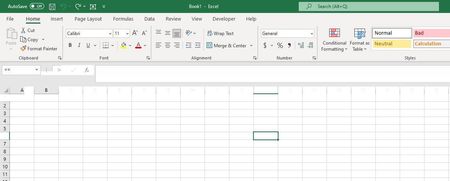
Excel headers disappearing when moused over
- Jul 04, 2022
One of the probable causes could be that the program updates were not done correctly by the system. Therefore, you can try the following beforehand
Install the latest update
Repair Office programs
Start Office applications in safe mode
Identify possible problems with the add-in
Check if the file was created by a third party
Hope I was able to help you with this info.
If this not helps…
There are a number of factors that can cause problems.
If, for example, a PC is switched off while a Windows update is being carried out, system files are moved to the hard disk or application processes are abruptly terminated.
Existing VBA macros in the file.
Virus and malware attacks can also cause computer problems, as can manual changes in the registry or faulty software uninstallations.
These are all just assumptions, in order to be able to say more precisely here, I recommend inserting a file (without sensitive data) in order to be able to reproduce the problem on another PC.
At the same time, information about the Excel version, operating system and storage medium would be of the greatest advantage in order to narrow down the troubleshooting and provide a more concrete solution proposal.
Thank you for your understanding and patience
I know I don't know anything (Socrates)

One of the probable causes could be that the program updates were not done correctly by the system. Therefore, you can try the following beforehand
Install the latest update
Repair Office programs
Start Office applications in safe mode
Identify possible problems with the add-in
Check if the file was created by a third party
Hope I was able to help you with this info.
If this not helps…
There are a number of factors that can cause problems.
If, for example, a PC is switched off while a Windows update is being carried out, system files are moved to the hard disk or application processes are abruptly terminated.
Existing VBA macros in the file.
Virus and malware attacks can also cause computer problems, as can manual changes in the registry or faulty software uninstallations.
These are all just assumptions, in order to be able to say more precisely here, I recommend inserting a file (without sensitive data) in order to be able to reproduce the problem on another PC.
At the same time, information about the Excel version, operating system and storage medium would be of the greatest advantage in order to narrow down the troubleshooting and provide a more concrete solution proposal.
Thank you for your understanding and patience
I know I don't know anything (Socrates)