Forum Discussion

Oliullah_Siddique
Jun 24, 2022Brass Contributor
Excel Function
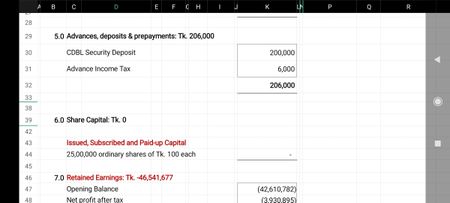
Hello, Problem 01: I used the sumif function in cell k30 & 31, it worked. =SUMIF('Sheet 2'!G:G,C30,'Sheet 2'!I:X) But not working in cell k44. =SUMIF('Sheet 2'!G:G,C43,'Sheet 2'!I:X) The...

Riny_van_Eekelen
Jun 24, 2022Platinum Contributor
Oliullah_Siddique The sum_range should not be multiple columns . When you do that it just takes the value from the first one. So, in fact all the numbers in Sheet1 come from column I, where I assume that the debits should come from column W:W and the credits from column X:X

Oliullah_Siddique
Jun 24, 2022Brass Contributor
Riny_van_Eekelen
Would you please suggest a formula for this:
In cell C46, I used the formula
="Retained Earnings: Tk. "&FIXED(K49,0)
The value comes in minus form: -46,541,677
I need it in paranthesis form: (46,541,677)
Would you please suggest a formula for this:
In cell C46, I used the formula
="Retained Earnings: Tk. "&FIXED(K49,0)
The value comes in minus form: -46,541,677
I need it in paranthesis form: (46,541,677)
- Riny_van_EekelenJun 24, 2022Platinum Contributor
Oliullah_Siddique Try it this way:
="Retained Earnings: Tk. "&TEXT(-K49,"(#,##0)")