Forum Discussion

Tobysan
Nov 01, 2025Tin Contributor
Excel formula to take time off from a time range
I am trying to get Cell D2 to give me a result based on the result in C2. I have 4 different time "zones" Each time slot has an amount of time taken off so if the employee starts at 7am and finishe...
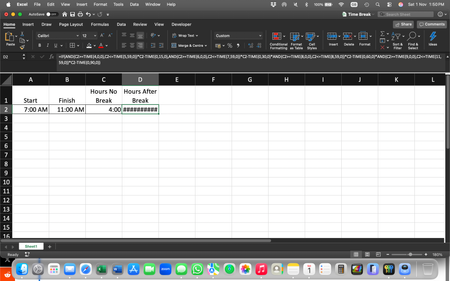
- Nov 04, 2025
Understand the logic
You have time ranges and corresponding break deductions:
Hours Worked (C2)
Break Deduction
4:00 – 5:59
15 minutes
6:00 – 7:59
30 minutes
8:00 – 8:59
60 minutes
9:00 – 11:59
90 minutes
You want D2 = C2 - break.
Correct Excel Formula:
=IF(AND(C2>=TIME(4,0,0),C2<=TIME(5,59,0)), C2-TIME(0,15,0),
IF(AND(C2>=TIME(6,0,0),C2<=TIME(7,59,0)), C2-TIME(0,30,0),
IF(AND(C2>=TIME(8,0,0),C2<=TIME(8,59,0)), C2-TIME(1,0,0),
IF(AND(C2>=TIME(9,0,0),C2<=TIME(11,59,0)), C2-TIME(1,30,0),
C2))))
Make sure C2 is in time format (e.g., [h]:mm if it can exceed 24 hours).
TIME(hours, minutes, seconds) works the same on Mac.
My answers are voluntary and without guarantee!
Hope this will help you.


JohnVergaraD
Nov 05, 2025Copper Contributor
Hi everyone!
Another option could be:
=C2-LOOKUP(C2,{4,6,8,9}/24,{15,30,60,90}/1440)Blessings!