Forum Discussion

Excel formula similiar to texjoin
hy all
I need help if is possible.
I need formula to read a complete row and when find data combine it with cell name where data is found, and to skip blanks and zeroes, and move on to next
tnx
11 Replies
 Patrick2788Silver Contributor
Dynamic array solution:
=IFERROR(FILTER(FILTER($C$3:$Z$3&$C$3:$Z$27,$B$3:$B$27=$B30),LEFT(FILTER($C$3:$Z$27&$C$3:$Z$3,$B$3:$B$27=$B30))<>"0"),"")
- Carlo74Copper Contributor
Thanks
this solution also works great, but I can't use dynamic formulas because it cant be inserted into a table.
I need table because flow cannot rad data outside a table.
but tnx, this is great solution, I hope I will learn to write similiar formulas one day 🙂
- SergeiBaklanDiamond Contributor
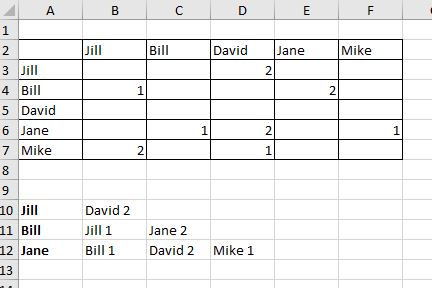
I didn't catch you'd like to join result in one string or keep in separate cells as in your screenshot. If the latest like
I'd add helper column as here in Column G (could be in any other place). In A10
=IFERROR(INDEX($A$3:$A$7,AGGREGATE(15,6,1/($G$3:$G$7>0)*(ROW($A$3:$A$7)-ROW($A$2)),ROW()-ROW($A$9))),"")and drag it down till empty cells appear.
In B10
=IFERROR(
   INDEX($B$2:$F$2,
      AGGREGATE(15,6,1/(INDEX($B$3:$F$7,MATCH($A10,$A$3:$A$7,0),0)>0)*
         (COLUMN(INDEX($B$3:$F$7,MATCH($A10,$A$3:$A$7,0),0))-COLUMN($A$2)),
         COLUMN()-COLUMN($A$2)
      )
   ) & " " &
   INDEX(INDEX($B$3:$F$7,MATCH($A10,$A$3:$A$7,0),0),
      AGGREGATE(15,6,1/(INDEX($B$3:$F$7,MATCH($A10,$A$3:$A$7,0),0)>0)*
         (COLUMN(INDEX($B$3:$F$7,MATCH($A10,$A$3:$A$7,0),0))-COLUMN($A$2)),
         COLUMN()-COLUMN($A$2)
      )
   ),
"")
and drag it down and to the right.
- Carlo74Copper Contributor
- SergeiBaklanDiamond Contributor
- Carlo74Copper Contributor
SergeiBaklan thank you,
doen't work for me yet, but I'll figure it out.
could you just explain what is in formula last part, two empty rows for A2 and A9?
=IFERROR(INDEX($A$3:$A$7,AGGREGATE(15,6,1/($G$3:$G$7>0)*(ROW($A$3:$A$7)-ROW($A$2)),ROW()-ROW($A$9))),"") - Carlo74Copper ContributorThank you
 drvikasbhardwajCopper Contributor
Carlo74 are you use the "& "or not because this is use as jointed before that & also good from Concatenate_Range