Forum Discussion

Carlo74
Feb 16, 2020Copper Contributor
Excel formula similiar to texjoin
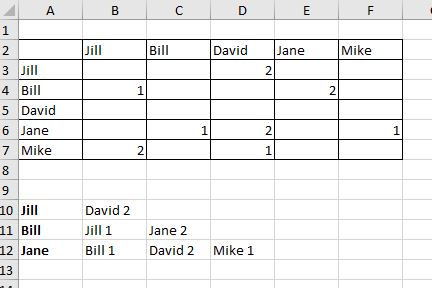
hy all I need help if is possible. I need formula to read a complete row and when find data combine it with cell name where data is found, and to skip blanks and zeroes, and move on to next tnx...

SergeiBaklan
Feb 17, 2020Diamond Contributor
I didn't catch you'd like to join result in one string or keep in separate cells as in your screenshot. If the latest like
I'd add helper column as here in Column G (could be in any other place). In A10
=IFERROR(INDEX($A$3:$A$7,AGGREGATE(15,6,1/($G$3:$G$7>0)*(ROW($A$3:$A$7)-ROW($A$2)),ROW()-ROW($A$9))),"")and drag it down till empty cells appear.
In B10
=IFERROR(
   INDEX($B$2:$F$2,
      AGGREGATE(15,6,1/(INDEX($B$3:$F$7,MATCH($A10,$A$3:$A$7,0),0)>0)*
         (COLUMN(INDEX($B$3:$F$7,MATCH($A10,$A$3:$A$7,0),0))-COLUMN($A$2)),
         COLUMN()-COLUMN($A$2)
      )
   ) & " " &
   INDEX(INDEX($B$3:$F$7,MATCH($A10,$A$3:$A$7,0),0),
      AGGREGATE(15,6,1/(INDEX($B$3:$F$7,MATCH($A10,$A$3:$A$7,0),0)>0)*
         (COLUMN(INDEX($B$3:$F$7,MATCH($A10,$A$3:$A$7,0),0))-COLUMN($A$2)),
         COLUMN()-COLUMN($A$2)
      )
   ),
"")
and drag it down and to the right.

Carlo74
Feb 17, 2020Copper Contributor
Thank you