Forum Discussion

Boyneelec
Aug 11, 2022Copper Contributor
Excel formula help
Hi All, I am looking for some help in getting a formula right for the following scenario. Photo 1 contains a brief description of what I am trying to do, While photo 2 is a screen grab from "sheet4"...
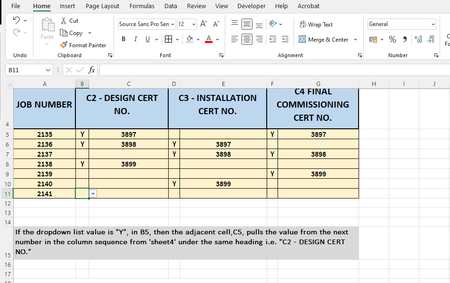
- Aug 12, 2022
Do you use comma as decimal separator? If so, replace all commas in the formula with semicolons.

HansVogelaar
Aug 11, 2022MVP
In C5:
=IF(B5="Y", INDEX(Sheet4!$A$3:$A$25, COUNTIF($B$5:$B5,"Y")), "")
In E5:
=IF(D5="Y", INDEX(Sheet4!$B$3:$B$25, COUNTIF($D$5:$D5,"Y")), "")
In G5:
=IF(F5="Y", INDEX(Sheet4!$C$3:$C$25, COUNTIF($F$5:$F5,"Y")), "")
Fill down.

Boyneelec
Aug 12, 2022Copper Contributor
HansVogelaar I tried that in all the appropriate cells but keep getting an error as below
- HansVogelaarAug 12, 2022MVP
Do you use comma as decimal separator? If so, replace all commas in the formula with semicolons.
- BoyneelecAug 12, 2022Copper ContributorHansVogelaar That worked a treat. Thank's a million