Forum Discussion

Excel formula help... again!
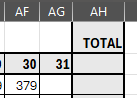

a) I would recommend not having separate tabs for month but have a running tally in the main tab and then you can pivot table or filter or create custom report tables as needed
b) If you stay with the current why not just have B3 = PriorSheet!AH3 and months with <31 days just don't use column AG as shown in the image. if the question is how to get the value from AF to AH then:
AH3 = MAX(AD3:AG3) [this assumes the values are always increasing]
or
AH3 = TAKE(AD3:.AG3, , -1) [this is the same as =TAKE(TRIMRANGE(AD3:AG3), , -1)
c) if you are trying to find a automatic way to reference the prior sheet without manually entering the formula you can use:
B3 = IF(SHEET()>1, INDEX(TOROW( 'FirstSheet:LastSheet'!AH3 ), SHEET() -1), 0)
- mathetesDec 18, 2025Gold Contributor
TOTALLY concur with m_tarler : it's generally a design mistake (in the sense that it makes things more complicated and is more error prone) to have a separate sheet for each month. This often happens because people carry-over the ledger sheet mentality to Excel, rather than taking advantage of Excel's superior ability to work from a single comprehensive datatable, producing monthly reports as needed, but also readily showing current status--whatever you want.
Are you open to reconsidering your design? If so, please give us a more complete picture of the application, ideally including an anonymized copy of the actual workbook.
 JoJo1Dec 18, 2025Copper Contributor
No the values does not increase, it differs, there are a few calculations I have on each cell already.
And the different sheets is just to organize it better for the client I'm trying to help.
I'll send a screenshot of what it is I'm working with:calculations include - each cows dried off cell deducts from cows in milk (CIM) and each dry cows calved adds to CIM again.
the total in the yellow block on the right needs to be the starting total for the next month in the opening balance as the calculations add and subtract again for the next month.
