Forum Discussion

Excel formula for availibility overview
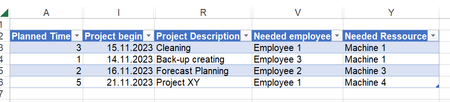

But I appreciate the effort, thanks und Grüße 😉

=LET(dates,
UNIQUE(SORT(DROP(REDUCE("",SEQUENCE(ROWS(Samples[Time Planned])),LAMBDA(x,y,VSTACK(x,TAKE(FILTER(SEQUENCE(INDEX(Samples[Time Planned],y)+QUOTIENT(INDEX(Samples[Time Planned],y),7)*2+5,1,INDEX(Samples[Project begin],y),1),(WEEKDAY(SEQUENCE(INDEX(Samples[Time Planned],y)+QUOTIENT(INDEX(Samples[Time Planned],y),7)*2+5,1,INDEX(Samples[Project begin],y),1),2)<6)),INDEX(Samples[Time Planned],y))))),1))),
lastdate,
SCAN("",SEQUENCE(ROWS(Samples[Time Planned])),LAMBDA(x,y,TAKE(VSTACK(x,TAKE(FILTER(SEQUENCE(INDEX(Samples[Time Planned],y)+QUOTIENT(INDEX(Samples[Time Planned],y),7)*2+5,1,INDEX(Samples[Project begin],y),1),(WEEKDAY(SEQUENCE(INDEX(Samples[Time Planned],y)+QUOTIENT(INDEX(Samples[Time Planned],y),7)*2+5,1,INDEX(Samples[Project begin],y),1),2)<6)),INDEX(Samples[Time Planned],y))),-1))),
emp_mach,
TOROW(SORT(UNIQUE(TOCOL(Samples[[Needed employee]:[Needed Ressource]])))),
HSTACK(VSTACK({""},dates),VSTACK(emp_mach,IFNA(MAKEARRAY(COUNTA(dates),COUNTA(emp_mach),LAMBDA(r,c,IFNA(INDEX(Samples[Project description],MATCH(1,(INDEX(dates,r)>=Samples[Project begin])*(INDEX(dates,r)<=lastdate)*(INDEX(emp_mach,c)=Samples[Needed employee]),0)),INDEX(Samples[Project description],MATCH(1,(INDEX(dates,r)>=Samples[Project begin])*(INDEX(dates,r)<=lastdate)*(INDEX(emp_mach,c)=Samples[Needed Ressource]),0))))),""))))
You are welcome. If you work with Office 365 or Excel for the web you can use this formula which excludes saturdays and sundays and dynamically spills the results according to the entries in the dynamic table.
- le00pNov 16, 2023Copper ContributorThank you so much Oliver, I will try that out 🙂