Forum Discussion

le00p
Nov 15, 2023Copper Contributor
Excel formula for availibility overview
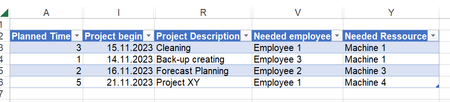
Hey Community, I am working in Excel trying to develop an overview for my company where we can see the scheduled projects and availibilities from our employees and ressources. We have a tabl...

Lorenzo
Nov 15, 2023Silver Contributor
Hi le00p
With Get & Transform aka Power Query:
(Machine 2 doesn't appear above as it has no planned activity yet)
In attached file:
- Put your data in the blue table sheet ProjectsLists
- Switch to sheet Avail. Overview
- Right-click in the green table > Refresh
 le00pNov 15, 2023Copper ContributorThank you very much. I tried it with my 3000 rows of projects and it seems to work already pretty good.
Do you know how I can change this to Monday to Friday only? For example if a project is Starting on a Friday and the planned time is 3 days, for now it would say in the availibility overview: Project is from Friday to Sunday. But I want it to be on Friday Monday and Tuesday.- LorenzoNov 16, 2023Silver Contributor
Hi le00p
Do you know how I can change this to Monday to Friday only?
Next question is likely going to be "how I can change this to exclude national holidays and company days off?" ;-))Before adding >= 3K projects to the attached file could you check the the few records I used and let me know if they're accurate from your perspective?
- le00pNov 16, 2023Copper ContributorYes, they are.