Forum Discussion

Excel Formula Blocking adjacent cels. Very Frustrating.
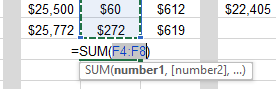

Try editing the formula in the formula bar instead of in the cell itself.
If you prefer editing in-cell. you can probably use the arrow keys to select a cell to the left or right of the cell with the formula.

The arrow idea sounds cool but I tried it and it highlighted a random cel a few rows up. I used the arrows on the number pad right side of keyboard plus I tried the arrows to left of keypad, same result. Was worth a try though.
- shipdriverOct 05, 2021Copper Contributor
It's happening again, aaagggh. Here is another example. I need to use the mouse to highlight the figure in the cel covered up by "SUM(number1...etc). With Office Professional 2000 this was never a problem. Somehow MS decided it was an improvement to take that capability away from us. They figured it's an improvement to figure out what cel that it is, then type a bunch of formula stuff.
I use alot of formulas this constantly frustrates me. It's not the most terrible thing to figure out what cel I need then go type a bunch of stuff. If I had never done it the easier way I wouldn't care. But to me it is just ludacris that an improvement (or at least a newer version) comes along and things become more difficult.