Forum Discussion

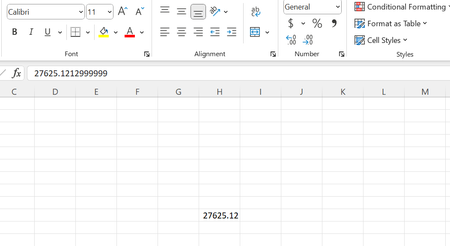
Excel formula bar displaying different value
 Jan 17, 2023
This is a formatting defect in Excel.
It is not a limitation of the internal binary representation (64-bit binary floating-point). Note that VBA has no problem displaying 27625.1213.
It happens to relatively few numbers whose internal binary approximation fits a particular pattern. The details are probably TMI. LMK if you are interested. But honestly, it does little good to know. Pragmatically, we cannot predict which numbers will be affected by the formatting defect.
IMHO, the best work-around is to enter VALUE("27625.1213").
-----
If left alone, the formatting defect can have surprising results. For example, if we enter the following formula:
=IF(27625.1213=VALUE("27625.1213"),"same","different")
initially the result is "same" even though the number of the left appears to be 27625.1212999999.
But if we edit the formula as follows:
=IF(27625.1212999999=VALUE("27625.1213"),"the same","different")
it now returns "different".
The reason is: in the initial formula, Excel uses the binary approximation of 27625.1213, even though the constant appears to be 27625.1212999999.
But when we edit the formula, Excel enters it exactly as it appears. So, the binary approximation of 27625.1212999999 is used.
Thus, we might get away with ignoring the appearance of 27625.1213 initially. But effectually, it will cause surprising results "inexplicably".

Hello atpthomas,
Try these:
A1: 27625.1212
A2: =$A$1+0.0001
then copy cell A2, and paste it as VALUE in cell A4
image below:
- JoeUser2004Jan 17, 2023Bronze Contributor
27625.1212+0.0001 only appears to work because Excel formats only up to 15 significant digits, rounded.
But with that expression in A2, note that
ISNUMBER(MATCH(VALUE("27625.1213"), A2, 0)) returns FALSE.
That is because the binary value of 27625.1212+0.0001 is not the same as the binary approximation of 27625.1213.
The exact decimal values of the internal binary approximations are shown below.
27625.1213
27625.12129999999888241291046142578125
27625.1212+0.0001
27625.12130000000252039171755313873291015625
27625.1212999999
27625.12129999990065698511898517608642578125