Forum Discussion

Remco_Verduin
Sep 09, 2021Copper Contributor
Excel Double list please help
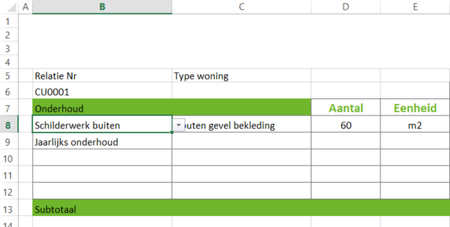
Hi, I created a list in cell B8 and depending on the choise made i want a set of choises in C8, For example: Now i have selected "schilderwerk buiten" depending on this choise i want diff...

HansVogelaar
Sep 09, 2021MVP
See the attached workbook. I used a combination of data validation and named ranges.
See Create Dependent Drop Down Lists for background information.
 Remco_VerduinSep 09, 2021Copper ContributorHansVogelaar It works, thank you very much.
I don't know i you also know how this works but for the option i selected there is a fixed data which can be automaticly filled in- HansVogelaarSep 09, 2021MVP
Would you like the first option to be filled in in column C?
(Je kan in het Nederlands antwoorden als je dat makkelijker vindt)
- Remco_VerduinSep 09, 2021Copper ContributorHi HansVogelaar
Ja inderdaad ik heb voor bepaald onderhoud een vaste eenheid en een vaste prijs per eenheid. Die wil ik afhankelijk van de optie automatisch laten invullen, bijvoorbeeld Houten gevel bekleding in m2 en 40 euro per m2
Als je weet hoe dit heet dan lukt het vaak wel via youtube maar ik heb geen idee