Forum Discussion

GreenfieldEnergy1
Dec 05, 2024Copper Contributor
Excel Creating Sales Tracker Different Values
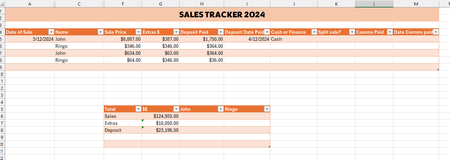
I am creating a Sales Tracker for my business and need the total sales amount to change depending on who I filter the table to show. For example, I have 2 employees, John and Ringo, when I filte...

Riny_van_Eekelen
Dec 09, 2024Platinum Contributor
You can add a Total row to the table via the Table ribbon, Table Style Options. Check the box 'Total Row' and you'll be given the opportunity to select the kind of total you want via a dropdown list.
Choose Sum and Excel will automatically insert a SUBTOTAL function that ignores hidden rows. Thus, when you filter for one person it will only sum the rows for that person.
If you want to SUM outside the table without the need to filter, look into using SUMIF or SUMIFS or create a pivot table from the Sales table.