Forum Discussion

Excel: Combining IF and duplicate value

- Jun 24, 2019
As a comment, that could be done without helper columns with formula rule for columns A and B as
=SUMPRODUCT(--ISNUMBER(MATCH($A1&$B1,$D$1:$D$100&$E$1:$E$100,0)))*NOT(ISBLANK($A1))
and similar for Team 2

Thanks mate,
That's great, that's already a huge step, but I still have a problem:
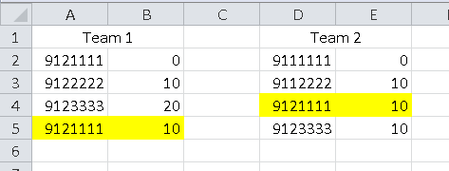
The formula is working great but it doesn't work if I update the list:
- The new data will turn red (I selected red instead of yellow), but the data that was already in there doesn't change
- On the screenshot, the yellow fields are the data that should have changed but didn't.
- On the screenshot, the lines 6 and 7 are new
Thank you so much, your answer helps me so much!!!!
Flo

As a comment, that could be done without helper columns with formula rule for columns A and B as
=SUMPRODUCT(--ISNUMBER(MATCH($A1&$B1,$D$1:$D$100&$E$1:$E$100,0)))*NOT(ISBLANK($A1))
and similar for Team 2
- Florent_beJun 24, 2019Copper Contributor
Hello Sergei,
Thanks for your answer, that's exactly what I wanted!!!!
Again, thank you!!!!
Flo
- SergeiBaklanJun 25, 2019Diamond Contributor
Flo, you are welcome