Forum Discussion

Excel Challenge - Pivoting poorly structured data
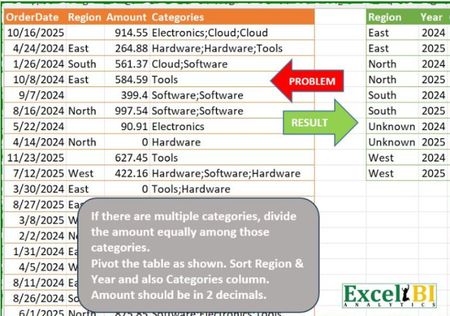
- Jan 18, 2026
This won't win the award for shortest function. I didn't set out to make a generalized function, but a modular approach using existing functions in my library allowed me to pull this together quickly.
//-----------------------------------------------------------------------------------
//PivotbyCatλ
//-----------------------------------------------------------------------------------
// Author:  Patrick H
// Date:    1/18/2026
// Description:
//   Pivot by row fields (one of which is a date), categories, and values.
//   It's presumed the categories array must be split prior to aggregation so a
//   delimiter must be specified. With optional parameters for aggregation type (function)
//   and date display (date_format).
// Parameters:
//   row_detail        - 1D Array of non-dates.
//   row_dates         - 1D Array of dates.
//   categories        - 1D Array containing category information strung together with a delimiter.
//   values            - 1D Array of numbers.
//   delimiter         - Delimiter used in the categories array.
//
// Optional Parameters:
//   [date_format]     - Format code for dates array. If omitted, defaults to "yyy".
//   [function]        - ETA or Lambda function for aggregation. If omitted, defaults to SUM.
//
// Lambdas called:      Streakλ, RepeatRowsλ


PivotbyCatλ=
LAMBDA(
    row_detail,row_dates,categories,values,delimiter,[date_format],[function],

//Validate inputs
LET(
    //Dimensions
    r₁,            ROWS(row_detail),  r₂,     ROWS(row_dates),
    r₃,            ROWS(categories),  r₄,     ROWS(values),

    //Halting scenarios
    ShapeMismatch, OR(r₁ <> r₂,r₁ <> r₃,r₁ <> r₄),

    InvalidDates,  OR(AND(ISERROR(DATEVALUE(TEXT(row_dates,date_format))),
                          ISERROR(VALUE(TEXT(row_dates,date_format)))),
                      NOT(AND(ISNUMBER(row_dates)))),

    InvalidFn,     AND(NOT(ISOMITTED(function)),
                       ISERROR(BYROW({1,1;2,2},function))),

    scenarios,     VSTACK(ShapeMismatch,InvalidDates,InvalidFn),

    errors,        {"#DIMENSIONS!";"#DATES!";"#INVALID-FUNCTION!"},

    //Logic gate
    FILTER(errors,scenarios,

//Proceed
LET(
    //Optional parameters
    fnλ,        IF(ISOMITTED(function),SUM,function),
    date_format,IF(ISOMITTED(date_format),"yyy",date_format),

    //Local functions
    CountCatλ,  LAMBDA(row,COUNTA(TEXTSPLIT(row,delimiter))),
    Parseλ,     LAMBDA(array,instance,
                       TEXTBEFORE(TEXTAFTER(delimiter&array&delimiter,
                       delimiter,instance,,,array),delimiter,,,,categories)),

    //Categories in each row
    k,          BYROW(categories,CountCatλ),

    //Indices
    i,          RepeatRowsλ(SEQUENCE(r₁),k),
    j,          Streakλ(i),

    //Row fields
    a,          RepeatRowsλ(row_detail,k),
    detail,     IF(a= 0, "Unknown",a),
    dates,      RepeatRowsλ(TEXT(row_dates,date_format),k),
    sort_key,   IFERROR(DATEVALUE(dates),VALUE(dates)),
    row_fields, HSTACK(sort_key,detail,dates),

    //Column fields
    unpack,     RepeatRowsλ(categories,k),
    categories, Parseλ(unpack,j),

    //Value field
    values,     RepeatRowsλ(values / k,k),

    //Aggregation
    agg,        DROP(PIVOTBY(row_fields,categories,values,fnλ,,0,,0),,1),
    agg
    ))));


//-----------------------------------------------------------------------------------
//Streakλ
//-----------------------------------------------------------------------------------
// Author:  Patrick H
// Date:    12/22/25
// Description:
//   Calculate streaks of consecutive values within 1D or 2D arrays.
//
// Parameters:
//   array             - Array (1D or 2D).
//
// Optional Parameters:
//   [Horizontal?]     - For 1D arrays, calculate streaks column‑wise instead of row‑wise.
//   [Include_Symbol?] - TRUE to include the symbol with streak counts (e.g., W·1, W·2, L·1).

Streakλ=
LAMBDA(
    array,[Horizontal?],[Include_Symbol?],

// Handle scalar input
IF(AND(ROWS(array)=1,COLUMNS(array)=1),array,
LET(
    //Dimensions
    i,      ROWS(array),     j,COLUMNS(array),
    Is2D?,  AND(i>1,j>1),

    //Flatten if 2D array
    array,  IF(Is2D?,TOCOL(array),array),

    //Direction for stacking
    NoDir?, ISOMITTED(Horizontal?),
    fn,     IF(NoDir?,VSTACK,HSTACK),

    //Build true/false array for streak detection
    kept,   IF(NoDir?,DROP(array,-1),DROP(array,,-1)),
    bool,   array=fn("omit",kept),

    //Accumulate streak counts
    acc,    SCAN(0,bool,LAMBDA(a,v,IF(a=0,1,IF(v,a+1,1)))),

    //Optionally include symbol with streak counts
    result, IF(ISOMITTED(Include_Symbol?),acc,
                                          array&UNICHAR(183)&acc),

    //Wrap result back to 2D if original array was 2D
    deliver,IF(Is2D?,WRAPROWS(result,j),result),

    deliver
)));

//-----------------------------------------------------------------------------------
//RepeatRowsλ
//-----------------------------------------------------------------------------------
//Author:   Patrick H.
//Date:   	11/7/2025
//Version:	1.0

//Description:
//Repeat each row in the supplied array by a corresponding repeat count.
//Arrays and scalars are supported.
//-----------------------------------------------------------------------------------
//Parameters:
//array    -    array to be repeated
//repeat   -    1D array of repeat integers

RepeatRowsλ =
LAMBDA(
    array,
    repeat,

//Check inputs
IF(OR(ISTEXT(repeat),repeat<=0),#VALUE!,

LET(
    //Flatten input
    repeat,  TOCOL(repeat),

    //Dimensions and row indexing
    A↕,      ROWS(array),  R↕,ROWS(repeat),

    r,       IF(A↕<>R↕,EXPAND(repeat,A↕,,@TAKE(repeat,-1)),
                 repeat),

    i,       SEQUENCE(ROWS(r)),

    m,       MAX(r),

    idx,     LAMBDA(TOCOL(IF(SIGN(r-SEQUENCE(,m,0))=1,i,NA()),2)),

    //Unwrap idx but defer delivery until function invocation
    deliver, LAMBDA(CHOOSEROWS(array,idx())),

    deliver
))());
Pivot by row fields (one of which is a date), categories, and values.


Good stuff, Peter! Nice demonstration of the power of your custom function collection for evaluating nested arrays.
I see the majority of the other dynamic array solutions offered up in the comments section of that LinkedIn post use some variation of DROP-REDUCE-VSTACK to perform each step on a row-by-row basis. In this particular situation, however, it is possible to conduct a TOCOL-broadcasting method (unpivot) over the entire table and pass the normalized fields directly to PIVOTBY:
=LET(
    num, LEN(Categories)-LEN(SUBSTITUTE(Categories,";",))+1,
    arr, TEXTBEFORE(TEXTAFTER(";"&Categories&";",";",SEQUENCE(,MAX(num))),";"),
    fnλ, LAMBDA(err,LAMBDA(vec,TOCOL(IF(err,arr,vec),2)))(ISERROR(arr)),
    PIVOTBY(HSTACK(fnλ(IF(ISBLANK(Region),"Unknown",Region)),fnλ(YEAR(OrderDate))),TOCOL(arr,2),fnλ(Amount/num),SUM,0,0,,0)
)
Or with CHOOSEROWS and a single broadcast of the table row IDs:
=LET(
    num, LEN(Categories)-LEN(SUBSTITUTE(Categories,";",))+1,
    arr, TEXTBEFORE(TEXTAFTER(";"&Categories&";",";",SEQUENCE(,MAX(num))),";"),
    fnλ, LAMBDA(rId,LAMBDA(vec,CHOOSEROWS(vec,rId)))(TOCOL(IF(ISERROR(arr),arr,SEQUENCE(ROWS(arr))),2)),
    PIVOTBY(HSTACK(fnλ(IF(ISBLANK(Region),"Unknown",Region)),fnλ(YEAR(OrderDate))),TOCOL(arr,2),fnλ(Amount/num),SUM,0,0,,0)
)
Kind regards.

David, Interesting solutions! I think that, where possible, obtaining 2D arrays by broadcasting vectors is more efficient than resorting to arrays of functions. Against that, I have been trying to avoid idiosyncratic solutions that are specific to a problem and also to increase my use of arrays of functions (so called 1st class citizens of the new environment). The trouble is that I am so focussed on arrays of functions as the base element of all calculation that I sometimes overlook broadcasting where it is applicable.