Forum Discussion

Excel absolute cell
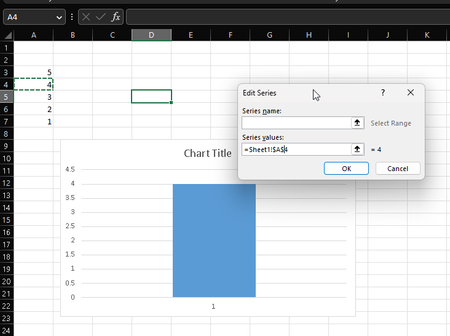

On the Formulas tab of the ribbon, in the Defined Names group, click Define Name.
Enter a name consisting of a single word in the Name box, e.g. Data.
In the Refers to box, enter the formula =INDIRECT("Sheet1!A4")
Click OK.
Click anywhere on the chart.
On the Chart Design group of the ribbon, in the Data group, click Select Data.
Select the series, under Legend Entries (Series), then click Edit.
Clear the box, then enter the formula =Sheet1!Data (using the name that you specified earlier).
Click OK, then click OK to close the Select Data Source dialog.
 GSM101May 23, 2023Copper Contributor
HansVogelaar Thanks for your reply!
You know what the problem is?I defined the name, it went without error.. but, when I'm trying to select data from graph and type:
=TTT Sheet uno!Data it gives me the error above.- HansVogelaarMay 23, 2023MVP
- GSM101May 23, 2023Copper Contributor