Forum Discussion

[Excel 2019 ] What is a more elegant way to solve this problem?
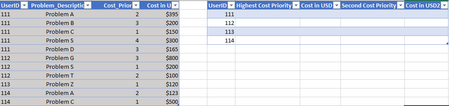
 Nov 28, 2021
=INDEX(IDTable,MATCH(F2&SMALL(IF(IDTable[UserID]=F2,IDTable[Cost_Priority]),1),IDTable[UserID]&IDTable[Cost_Priority],0),2)
=VLOOKUP(F2&G7,CHOOSE({1,2},IDTable[UserID]&IDTable[Problem_Description],IDTable[Cost in USD]),2,0)
Maybe you want to apply formulas like these.
=INDEX(IDTable,MATCH(F2&SMALL(IF(IDTable[UserID]=F2,IDTable[Cost_Priority]),1),IDTable[UserID]&IDTable[Cost_Priority],0),2)
=VLOOKUP(F2&G7,CHOOSE({1,2},IDTable[UserID]&IDTable[Problem_Description],IDTable[Cost in USD]),2,0)
Maybe you want to apply formulas like these.
- Mike_Vu_NgoNov 28, 2021Copper Contributor
OliverScheurich
Thank you! This is what I'm looking for. Using the same functions but with much better approach.
Just one question: when I open your file on my Excel, there are "{" and "}" symbols cover the formula. When I take it out the formula returns as error. As you can see in the screenshot I take out the { } in H7 and this happens, while G7 works.
What is "{" and why does the error occurs? I tried to copy the text in the formula to another cell but it too doesnt work.- OliverScheurichNov 29, 2021Gold Contributor
I'm glad my solution is helpful.
The suggested formulas are arrayformulas. If you don't work with Office365 or 2021 you have to enter arrayformulas with ctrl+shift+enter. This automatically puts the curly brackets { } around the formula and the formula works.
If you click into the formula bar of an arrayformula you can click the red cross to leave the formula and keep it working. In the attached file i manually entered a blue arrow to show where to click. If the formula returns an error, press ctrl+shift+enter to initiate the arrayformula.
- SergeiBaklanNov 28, 2021Diamond Contributor
As variant to avoid array formulae
Unique UserID:

=IFERROR(
  INDEX( IDTable[UserID],
    AGGREGATE(15, 6,
              1/ ( COUNTIF( $F$12:F12, IDTable[UserID] ) = 0 ) *
              ( ROW( IDTable[UserID] )-ROW( IDTable[[#Headers],[UserID]] ) ), 1 ) ),
"" )

Problem Description (first)
=IFERROR(
   INDEX( IDTable[Problem_Description],
     MOD(
       AGGREGATE( 15, 6, 1 / ( IDTable[UserID] = $F13 ) *
            ( IDTable[Cost_Priority] + ( ROW( IDTable[UserID] ) - ROW( IDTable[[#Headers],[UserID]] ) ) / 100 ),  1),
     1 ) * 100 ),
"")
The rest is practically the same

