Forum Discussion

Mike_Vu_Ngo
Nov 28, 2021Copper Contributor
[Excel 2019 ] What is a more elegant way to solve this problem?
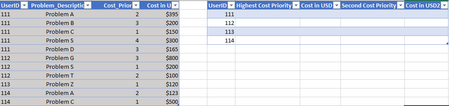
So I have 2 tables like this and want to return the correct value based on the UserID. As you can see there are multiple instances of the same UserID with different cost priority. I don't h...
 Nov 28, 2021
=INDEX(IDTable,MATCH(F2&SMALL(IF(IDTable[UserID]=F2,IDTable[Cost_Priority]),1),IDTable[UserID]&IDTable[Cost_Priority],0),2)
=VLOOKUP(F2&G7,CHOOSE({1,2},IDTable[UserID]&IDTable[Problem_Description],IDTable[Cost in USD]),2,0)
Maybe you want to apply formulas like these.

Riny_van_Eekelen
Nov 28, 2021Platinum Contributor
Mike_Vu_Ngo Perhaps one or more pivot tables can do what you need. Not exactly in the same format, but it's close. See attached.
- Mike_Vu_NgoNov 28, 2021Copper Contributor
Riny_van_Eekelen
Hello, thank you! I'm learning Excel and I want to tackle real tasks. I can use Pivot table but in this particular problem I want to keep the format, hence my approach.
