Forum Discussion

salway42
Sep 24, 2020Copper Contributor
Excel - conditional formatting help
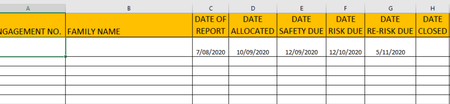
Hi Please help, I have created a spreadsheet and have formulas when a date is enter it projects 30 day and 90 days into their respective columns. I would like to conditional format these columns to ...

Riny_van_Eekelen
Sep 25, 2020Platinum Contributor
salway42 Sorry, but I don't follow your dates here. You mention that column F = C plus 90 days, but I guess you mean column G = C plus 90 days? You are using a date format d/mm/yyyy aren't you?
Similarly, you say that E = D plus 30 days. I guess, you mean F = E plus 30 days. And where do I find the "projected date"? And is it E and F you want to conditionally format, or perhaps F and G or G and H?
Any how, you should create two rules. One that checks if the cell value is between the "projected date" minus 5 days and the "projected date" (green). Another rule needs to check if the cell value is equal or greater than the "projected date" (red).

salway42
Sep 25, 2020Copper Contributor
Ok thanks a bundle 🙂