Forum Discussion

Error when subtracting dates in excel
- Aug 11, 2023
I can only repeat myself: Negative time value are displayed with ########.
If I put the "same" data in my spreadsheet it looks a little different.
The reason behind the tiny decimal number is the "floating point error".
You could round your result. Or you could convert the time values into decimal minutes (x60x24) and convert the result back into a time value (/60/24). Change the number format accordingly.
=D5*24*60-C5*24*60-($F$2*24*60+$F$3*24*60)

Detlef_Lewin
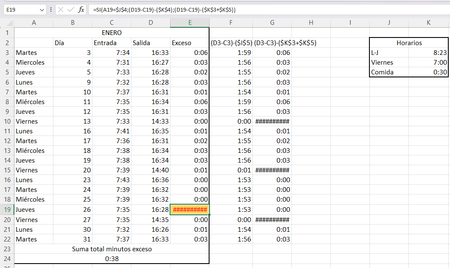
It is 0 the value of that cell. That cell has an if operation where it checks if it is Friday or not to do one operation or another. If I do the operations without that IF, what appears on the right, which is 0:00, appears, but if I put it in the if, #### appears. The numbers are as follows
16:28:00 - 7:35:00 - 8:23:00 + 0:30:00
Doing the next minute and the previous minute doesn't happen and it doesn't happen to me with any other value that matches 0
scientific value
numeric value
Why is this happening? Is it a very low level bug? It does not generate any problem for me because the truth is that this excel is to have my own control but now I am simply curious about why this happens

I can only repeat myself: Negative time value are displayed with ########.
If I put the "same" data in my spreadsheet it looks a little different.
The reason behind the tiny decimal number is the "floating point error".
You could round your result. Or you could convert the time values into decimal minutes (x60x24) and convert the result back into a time value (/60/24). Change the number format accordingly.
=D5*24*60-C5*24*60-($F$2*24*60+$F$3*24*60)
- Raxmon2023Aug 11, 2023Copper ContributorPerfect, thank you very much for telling me what happens