Forum Discussion

Batman-379
Jan 18, 2023Copper Contributor
Employee Absence Schedule - Record Sickness Spells - I am counting all 'S' easy enough
Hi I am counting all 'S' easy enough which gives me a total count of the sickness days taken but now i want to count up the sickness periods too. So say Employee 1 has two consecutive days off ...
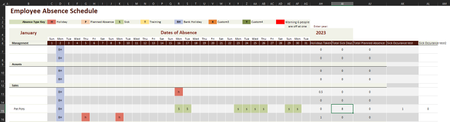
- Jan 18, 2023The problem with [Employee Name] is that you change that column title to [Management] so try:
=SUMPRODUCT((January[@[Management]:[30]]<>"S")*(January[@[1]:[31]]="S"))
that said, this formula will treat F...M sickness as 2 separate instances not 1 long instance that spanned across the weekend unless Sa/Su are also marked "S"

mtarler
Jan 18, 2023Silver Contributor
I see that you have 'S' sick days on weekends too so if we don't have to exclude weekend days (i.e. sick on F and then again on M even though Sa/Su are blank will count as 2 episodes instead of 1) then something like:
=SUMPRODUCT((January[@[Employee Name]:[30]]<>"S")*(January[@[1]:[31]]="S"))
=SUMPRODUCT((January[@[Employee Name]:[30]]<>"S")*(January[@[1]:[31]]="S"))
 Batman-379Jan 18, 2023Copper ContributorHi that was my mistake by sticking S's in the table and not taking notice of the weekends! I've removed it now, I can't get that formula to work though, it doesn't accept the employee name at all, the only way I was able to get excel to accept the formula is to use a numerical value instead:
=SUMPRODUCT((January[@[1]:[30]]<>"S")*(January[@[1]:[31]]="S"))
but this just gives me a #N/A- mtarlerJan 18, 2023Silver ContributorThe problem with [Employee Name] is that you change that column title to [Management] so try:
=SUMPRODUCT((January[@[Management]:[30]]<>"S")*(January[@[1]:[31]]="S"))
that said, this formula will treat F...M sickness as 2 separate instances not 1 long instance that spanned across the weekend unless Sa/Su are also marked "S"- Batman-379Jan 18, 2023Copper ContributorIt worked perfectly! thank you! yes maybe I should have put another column in before or after the employee name column that says what department they reside in, but your formula works a charm!