Forum Discussion

ben_n_yc
Oct 08, 2021Copper Contributor
Dynamic data validation lists populated from another cell
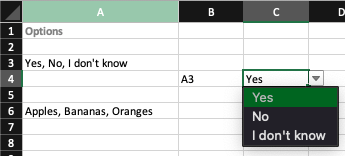
I am trying to achieve two things which I presume are possible but I'm unsure of where to start. What I am hoping to achieve is to populate the list (shown in cell C4) with the data ente...

bosinander
Oct 09, 2021Steel Contributor
ben_n_yc FILTERXML can be used to split the comma separated values.
I prefer making them look like HTML
="<tr><td>" & SUBSTITUTE(A3;",";"</td><td>") & "</td></tr>"
<tr><td>Yes</td><td> No</td><td> I don't know</td></tr>
and from there parse them to separate cells.
=FILTERXML("<tr><td>" & SUBSTITUTE(INDIRECT(B4);",";"</td><td>") & "</td></tr>";"//td")
=INDIRECT(B4) is one way to redirect to different set of options.