Forum Discussion

Dynamic array sumifs 0's till last row won't work
 Mar 21, 2023
I'm also very unclear as to what you require. Do these help?
=VSTACK(SEQUENCE(A1,,0,0),A2)or
=IF(SEQUENCE(A1+1,,A1,-1),0,A2)where A1 and A1 contain 9 and -15500 respectively.

 FloydGlennMar 20, 2023Copper Contributor
Expected result is as follows
0
0
0
0
0
0
0
0
0
-15500
Based on the input or the dynamic array input built upon it.
In this case it was 9 so it should produce 9 sequential 0's followed by the -15500
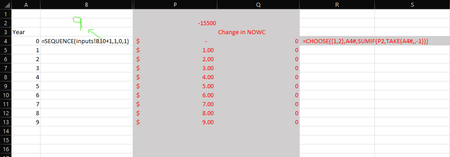
this will get me out the last pieces i need before i have to tackle my next problem the formula i tried is
=CHOOSE({1,2},A4#,SUMIF(P2,TAKE(A4#,,-1))
Where A4#
IS
=SEQUENCE(inputs[9]+1,1,0,1)
This is my most recent of 10 different variants of dynamic arrays i've tried to get SOME input to end up at a given row number essentially. not just the last one but any of them or a series of periods rather is the greater issue- JosWoolleyMar 21, 2023Iron Contributor
I'm also very unclear as to what you require. Do these help?
=VSTACK(SEQUENCE(A1,,0,0),A2)or
=IF(SEQUENCE(A1+1,,A1,-1),0,A2)where A1 and A1 contain 9 and -15500 respectively.