Forum Discussion

AKampianakis
Apr 08, 2022Copper Contributor
Duplicates Highlight with conditional rule for range
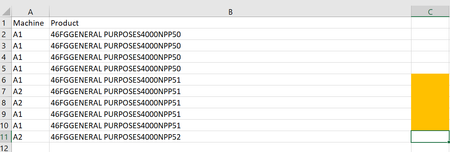
Hello, I would like to make a calculation or find a way to do this: in the picture above I have 2 different columns. 1 is Machines , and the other is Product. I would like to highlight the...

HansVogelaar
Apr 08, 2022MVP
Select the range you want to format conditionally, for example C2:C11, or rows 2 to 11 in their entirety.
The active cell in the selection should be in row 2.
On the Home tab of the ribbon, click Conditional Formatting > New Rule...
Select 'Use a formula to determine which cells to format'.
Enter the formula
=SUM(--(LEN(UNIQUE(FILTER($A$2:$A$11,$B$2:$B$11=$B2,"")))>0))>1Adjust the ranges if needed.
Click Format...
Activate the Fill tab.
Select a color.
Click OK twice.