Forum Discussion

Drop down list change other multiple cells

Hello mathetes !
Thank you for your reply.
I'm sure that there were a few surprises that didn't make any sense for you when you started to dissect my document. It was just to give to you as an better understanding of the question rather than for you to find discrepancies in it. However, I'm thankful for your input and will make sure to clean my document further once I solve my initial problem.
This is my first time that I submit a question on this forum and therefore was unsure if people usually do actual modification in the documents rather than to explain for the sender how to do it them selves.
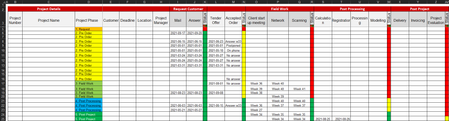
The documents intent is for me and my co-workers to be able to go in, add a new project and follow its progress. Right now I use it most frequently out of anybody. About a few times a week. Now I have been manually changing the dates as a request is submitted, answered, tender given and so on. It has been very time consuming and I have fail to be consistent in this work. Therefor I wanted to facilitate this by just changing the the drop down list in column D and this would complete the affected cells with date and so on, as I described it in the question.
Do we come any closer to a salvation? I basically look for a function that says when this cell changes in the drop down list, 'insert date in these cells' and 'change these drop down lists'.
Thanks again for engaging in this topic to help me.
/Elias

Closer perhaps. People here often make changes to spreadsheets that are posted.....and sometimes just point in the right direction.
From all that you've said, I'm thinking that you might benefit most from a macro or VBA routine and those are not my expertise at all. And, frankly, before you ask anybody else to help with that--there are people here who could do it--you really need to clean up those various discrepancies first so it's a clear description of what's needed, and a clean spreadsheet to work with.