Forum Discussion

Display Last Value in Column when certain criteria match
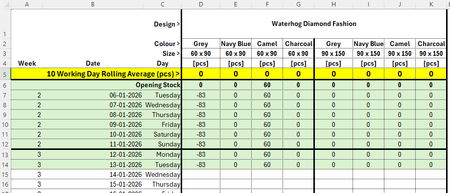

so I assume that first row with style is a merged cell with causes issues with tracking so the formula I created had to reformat that row to have those values repeated for every column. Here is the formula that would go in D2 of your second image:
=LET(data,D1:.Z1000,criteria,AA2:AC17,
lineone,TOROW(CHOOSECOLS(TOCOL(TAKE(data,1),3),SEQUENCE(8,,1,0))),
tdata,TRANSPOSE(VSTACK(lineone,DROP(data,1))),
out,BYROW(criteria,LAMBDA(r,SUM((MMULT(--(r=TAKE(tdata,,3)),{1;1;1})=3)*TAKE(tdata,,-1)))),
out)
where data is that data table starting with the first style in D1 and that .Z1000 should be adjusted to be at least the last column and last row of the data (but can be more as long as the rest is blank as that is what the dot before the Z is for)
the 'criteria' listed here as AA2:AC17 is the A2:C25 in your second image. NOTE: you must redo those filters to NOT include column D (where the formula will be) So you should turn those filters off and then highlight only columns A:C and reclick on filters.
edit: I'm attaching the file and hope it doesn't make my comment disappear ...