Forum Discussion

Display column as per list
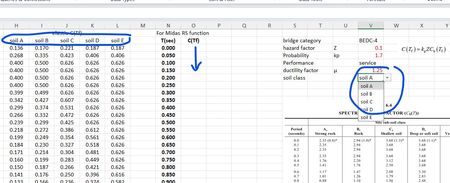
- Apr 15, 2025
alternatively for 1)
=CHOOSECOLS(H3:L999, XMATCH(V7, H1:L1))as for 2) I would recommend you create some LAMBDA functions for each equation A-E. Here is an example for A:
FofT_A = LAMBDA(T, IFS(
                    (T>0)*(T<=0.1), 0.8 + 15.5*T,
                    T<=1.5,  IF( 0.704/T<=2.35, 0.704/T, 2.35),
                    T> 1.5, 1.056/T^2,
                    TRUE, 0 ))
Then I would use a CHOOSE and maybe a MAP over all the Time values:
=MAP(N3:N999, LAMBDA( T, CHOOSE( XMATCH(V8, H1:L1), FofT_A(T), FofT_B(T), FofT_C(T), FofT_D(T), FofT_E(T) ) ) )I recommend you have those A-E functions separate so you can easily use them anywhere on the sheet but if you need a single formula it might be something like (but you need to fix the values for each of the sub-LAMBDAs:
=LET(TimeVals, N3:N999, DropDown, V8,
FofT_A = LAMBDA(T, IFS(
                    (T>0)*(T<=0.1), 0.8 + 15.5*T,
                    T<=1.5,  IF( 0.704/T<=2.35, 0.704/T, 2.35),
                    T> 1.5, 1.056/T^2,
                    TRUE, 0 )),
FofT_B = LAMBDA(T, IFS(
                    (T>0)*(T<=0.1), 0.8 + 15.5*T,
                    T<=1.5,  IF( 0.704/T<=2.35, 0.704/T, 2.35),
                    T> 1.5, 1.056/T^2,
                    TRUE, 0 )),
FofT_C = LAMBDA(T, IFS(
                    (T>0)*(T<=0.1), 0.8 + 15.5*T,
                    T<=1.5,  IF( 0.704/T<=2.35, 0.704/T, 2.35),
                    T> 1.5, 1.056/T^2,
                    TRUE, 0 )),
FofT_D = LAMBDA(T, IFS(
                    (T>0)*(T<=0.1), 0.8 + 15.5*T,
                    T<=1.5,  IF( 0.704/T<=2.35, 0.704/T, 2.35),
                    T> 1.5, 1.056/T^2,
                    TRUE, 0 )),
FofT_E = LAMBDA(T, IFS(
                    (T>0)*(T<=0.1), 0.8 + 15.5*T,
                    T<=1.5,  IF( 0.704/T<=2.35, 0.704/T, 2.35),
                    T> 1.5, 1.056/T^2,
                    TRUE, 0 )),
MAP(TimeVals, LAMBDA(T, CHOOSE( XMATCH(DropDown, H1:L1), FofT_A(T), FofT_B(T), FofT_C(T), FofT_D(T), FofT_E(T) ) ) )
)

alternatively for 1)
=CHOOSECOLS(H3:L999, XMATCH(V7, H1:L1))as for 2) I would recommend you create some LAMBDA functions for each equation A-E. Here is an example for A:
FofT_A = LAMBDA(T, IFS(
                    (T>0)*(T<=0.1), 0.8 + 15.5*T,
                    T<=1.5,  IF( 0.704/T<=2.35, 0.704/T, 2.35),
                    T> 1.5, 1.056/T^2,
                    TRUE, 0 ))
Then I would use a CHOOSE and maybe a MAP over all the Time values:
=MAP(N3:N999, LAMBDA( T, CHOOSE( XMATCH(V8, H1:L1), FofT_A(T), FofT_B(T), FofT_C(T), FofT_D(T), FofT_E(T) ) ) )I recommend you have those A-E functions separate so you can easily use them anywhere on the sheet but if you need a single formula it might be something like (but you need to fix the values for each of the sub-LAMBDAs:
=LET(TimeVals, N3:N999, DropDown, V8,
FofT_A = LAMBDA(T, IFS(
                    (T>0)*(T<=0.1), 0.8 + 15.5*T,
                    T<=1.5,  IF( 0.704/T<=2.35, 0.704/T, 2.35),
                    T> 1.5, 1.056/T^2,
                    TRUE, 0 )),
FofT_B = LAMBDA(T, IFS(
                    (T>0)*(T<=0.1), 0.8 + 15.5*T,
                    T<=1.5,  IF( 0.704/T<=2.35, 0.704/T, 2.35),
                    T> 1.5, 1.056/T^2,
                    TRUE, 0 )),
FofT_C = LAMBDA(T, IFS(
                    (T>0)*(T<=0.1), 0.8 + 15.5*T,
                    T<=1.5,  IF( 0.704/T<=2.35, 0.704/T, 2.35),
                    T> 1.5, 1.056/T^2,
                    TRUE, 0 )),
FofT_D = LAMBDA(T, IFS(
                    (T>0)*(T<=0.1), 0.8 + 15.5*T,
                    T<=1.5,  IF( 0.704/T<=2.35, 0.704/T, 2.35),
                    T> 1.5, 1.056/T^2,
                    TRUE, 0 )),
FofT_E = LAMBDA(T, IFS(
                    (T>0)*(T<=0.1), 0.8 + 15.5*T,
                    T<=1.5,  IF( 0.704/T<=2.35, 0.704/T, 2.35),
                    T> 1.5, 1.056/T^2,
                    TRUE, 0 )),
MAP(TimeVals, LAMBDA(T, CHOOSE( XMATCH(DropDown, H1:L1), FofT_A(T), FofT_B(T), FofT_C(T), FofT_D(T), FofT_E(T) ) ) )
)
 SP3990Apr 15, 2025Brass Contributor
Thanks a lot for this. i learnt something new. But i noted one thing, for this formula to work, the columns need to be empty otherwise it gives #spill error.
- m_tarlerApr 15, 2025Silver Contributor
yes, you cannot have a dynamic array 'spill' data into a cell that already has something there. Anytime you use one of these dynamic array formulas to spill an array or table of data you need to make sure the sheet is blank in the region you want the data to go. That also means you cannot go back and manually edit or change individual outputs/results.
You CAN easily convert the above into individual formulas and copy down. for example in the second case change N3:N990 to be just N3 and V8 to be $V$8 and also in the last line the H1:L1 to be $H$1:$L$1
then as you copy down the N3 will increment but the other cells will stay fixed. In this case I would HIGHLY recommend you save those sub LAMBDA functions into your NAME space and then all you would need is:
=CHOOSE( XMATCH( $V$8, $H$1:$L$1), FofT_A(N3), FofT_B(N3), FofT_C(N3), FofT_D(N3), FofT_E(N3) )
or you could even put all that into a LAMBDA of its own and just pass it the time value N3
That said, there are advantages to these Dynamic Array formulas:
a) you have the formula in only 1 cell (easier to edit/update if needed)
b) you can refer to the whole output of the formula using the # symbol after the cell and you don't have to know how MANY cells are being output. For example O3# would give you the whole column of values.
c) I believe it is more efficient in excel
ALSO I would recommend you consider the use of TABLES (use the 'Format as Table' on the home ribbon) and the use of NAMES. This will make it easier to read formulas and refer to cells. For example you can click on V8 then click on the box that shows V8 to the left of the formula bar and type "soil_class" or you can go into the Formula ribbon and do the same thing under the NAME MANAGER. But then in the formula you can type soil_class instead of $V$8 and when you see the formula you don't need to look to see what $V$8 is, because the name tells you what it is.
Oh and w/r to your comment re: Kidd's formula I think the problem is that your range was H3:L103 instead of H:L and the row part of the INDEX is ROW() which means it is taking that Row index from the array and as you copied down that H3:L103 reference also shifted down (because it wasn't locked using $). Another words I think your values are offset by 2 and incrementing by 2. so O3 is pointing at H5, O4 is pointing at H7, and so on. You could have used:
=INDEX(H3:L3, 1, MATCH($V$7, $H$1:$L$1, 0))
and filled down