Forum Discussion

Calheiro
May 20, 2024Copper Contributor
Dinamically Return Values From a Column Using A Merged Header Above It as Conditional
Hi, everyone! I need some help with a formula. See, I have the table layout as shown above and I need the "CS Month" (FM) column to return the values from daily CS+IN (Row 2) column dinamical...
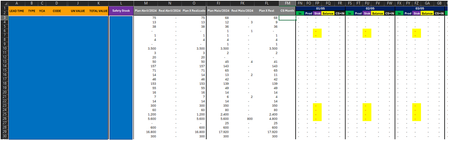
- May 20, 2024


GeorgieAnne
May 20, 2024Iron Contributor
Hello Calheiro
FIRST THING First: are you sure 100% no 110% that the offsets are working properly? I suggest you dissect the formula and make sure each part is yielding the correct anticipated result and then see which part maybe failing.
By dissect I mean if you have something like say this
=IF(XLOOKUP(Lookup_Value,Lookup_Array,Return_Array,"-----",FALSE)="-----","Not Found","Found) then you will copy the XLOOKUP portion and see what it returns and by doing this you can see what part of the formula is misbehaving and giving you unexpected results.
Let us know how you progress.
FIRST THING First: are you sure 100% no 110% that the offsets are working properly? I suggest you dissect the formula and make sure each part is yielding the correct anticipated result and then see which part maybe failing.
By dissect I mean if you have something like say this
=IF(XLOOKUP(Lookup_Value,Lookup_Array,Return_Array,"-----",FALSE)="-----","Not Found","Found) then you will copy the XLOOKUP portion and see what it returns and by doing this you can see what part of the formula is misbehaving and giving you unexpected results.
Let us know how you progress.

Calheiro
May 20, 2024Copper Contributor
Hello, Georgie! Thanks for replying.
So, I checked and my Match is returning the relative position of the section wich the merged header equals to today's date. Tbh, I can't seem to think how can I work from here though.
So, I checked and my Match is returning the relative position of the section wich the merged header equals to today's date. Tbh, I can't seem to think how can I work from here though.