Forum Discussion

Diagramme fixieren / mitscrollen lassen
Liebe Community, Ich habe eine Tabelle mit vielen Zeilen. Dazu gehört ein Diagramm. Wenn ich aber in der aktuellen Zeile,.. z.B. 350 etwas eintrage miss ich bisher immer wieder entweder hochscrollen um das Diagramm zu sehen, oder mir das Diagramm mit nach unten ziehen zu dem Bereich wo ich Daten eintrage. Gibt es eine Möglichkeit das Diagramm so auf dem Bildschirm zu fixieren, dass es immer an der gleichen Position bleibt egal wie hoch oder runter ich scrolle? Ist das verständlich?!
Bild: Diagramm bleibt da wo ich es hinschiebe
Bild: Ideal: Das Diagramm scrollt mit runter... WIE GEHT DAS?
Ich hoffe auf ein paar gute Tipps! Vielen Dank. Santandor
2 Replies
- amit_bholaIron Contributor
santandor , the method is in english but i hope you can follow it.
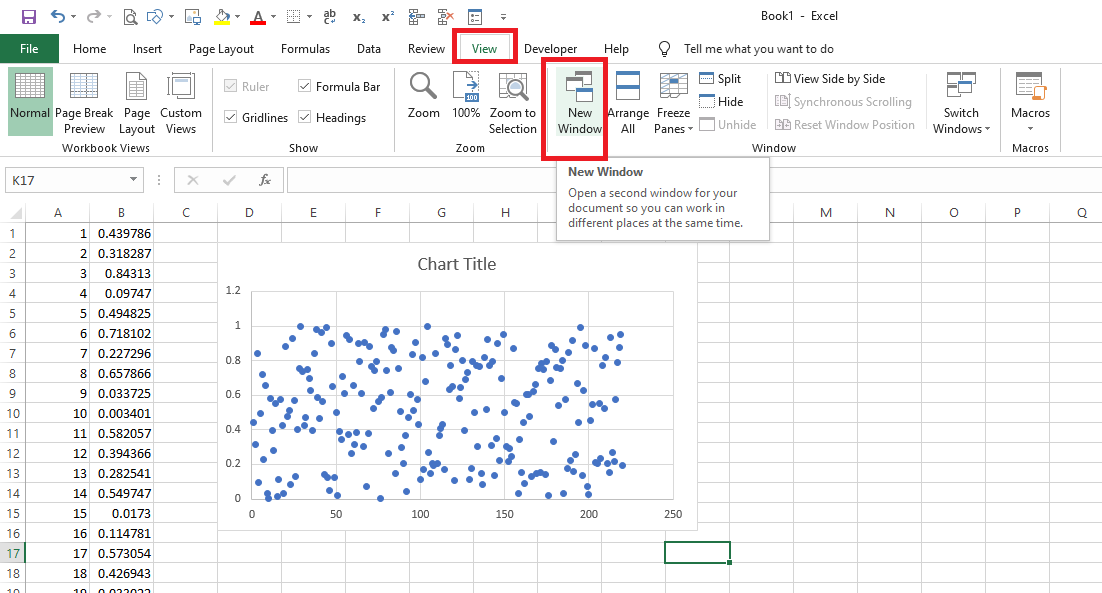
1) Go to View tab & Click "New Window" (see image 1)
2) You will note that a duplicate window of same file opened like this (see image 2)
3) Again go to View tab and click "Arrange All", then in the dialogue box, click "vertical" and "windows of active workbook" and then click "OK" (see image 3)
4) You will note that now same file is shown twice side by side like this (see image 4)
5) If you scroll down on left file, the right file remains at same position. So e.g. i go to row no. 121-122 , the chart is still visible on the right window (see image 5)
- amit_bholaIron Contributor