Forum Discussion

Cre4ture
Jul 29, 2022Copper Contributor
Dependent Drop Down in Template
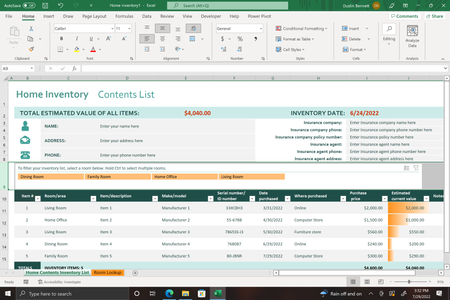
I am using the 'Home Inventory' template to organize an upcoming move. I would like to add a dependent drop-down list in a column following the Room/Area column that is located in C10. For the depend...
- Jul 29, 2022
Cre4ture If you are using Excel 365 or 2021, please see attached.
You need to re-structure the Room Lookup. List all boxes and add the room to each box. Then use UNIQUE and FILTER to create dynamic lists that will feed the drop-downs for both the rooms and the boxes.
The Data Validation formula for column D uses INDEX and MATCH to find the correct list from column K.

Riny_van_Eekelen
Jul 29, 2022Platinum Contributor
Cre4ture If you are using Excel 365 or 2021, please see attached.
You need to re-structure the Room Lookup. List all boxes and add the room to each box. Then use UNIQUE and FILTER to create dynamic lists that will feed the drop-downs for both the rooms and the boxes.
The Data Validation formula for column D uses INDEX and MATCH to find the correct list from column K.
 Cre4tureJul 30, 2022Copper ContributorThis is exactly what I needed! Thank you!! A true scholar!