Forum Discussion

Days worked in Month - PQ/M functions possibly
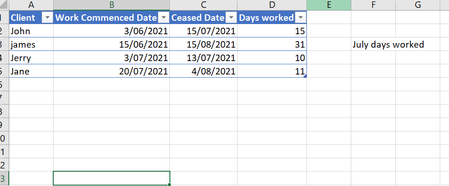
- Dec 15, 2021
davidmaddock54 As a variant, using the example kindly provided by tauqeeracma , try this:
=MIN($G$1,C2)-MAX(EDATE($G$1,-1)+1,B2)+1

davidmaddock54 As a variant, using the example kindly provided by tauqeeracma , try this:
=MIN($G$1,C2)-MAX(EDATE($G$1,-1)+1,B2)+1
 davidmaddock54Dec 16, 2021Brass ContributorThat seems like some sort of magic to be that short. Will be testing in actual sheet shortly. Thank you so much.
- Riny_van_EekelenDec 16, 2021Platinum Contributor
davidmaddock54 It isn't all that magical. Dates in Excel are in fact sequential numbers, starting at 1 for January 1, 1900.
So, with your problem the end date should not be after July 31 (i.e. minimum value of July 31 and the end date) and the start date should not be before July 1 (i.e. maximum value of July 1 and the start date). You can use the MIN and MAX functions for that. The EDATE function comes in to "calculate" the first day of the month, based on the given end date, but you could aslo enter the start date into its own cell and refer directly to that one.
- davidmaddock54Dec 16, 2021Brass ContributorAnd it works a treat. Added an IF formula as I needed cells to stay blank if data was incomplete and we're set. Thank you all.
- tauqeeracmaDec 16, 2021Steel Contributor
Ideally, your variant should be used as it is more simple and straightforward.
Nice one.
Thanks
Tauqeer
- davidmaddock54Dec 16, 2021Brass ContributorThank you. Certainly, my formulas were reaching that sort of length, but they weren't working!
