Forum Discussion

Seko_sonogo
Feb 21, 2023Copper Contributor
date timeline from start & end dates in excel
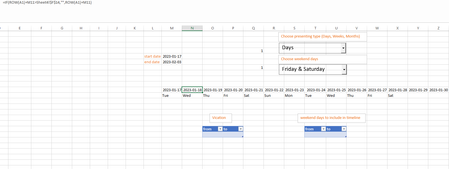
In this sheet, I would like to have a date timeline generated from 6 inputs: 1- start date ( where timeline should starts ) 2- end date ( where timeline should ends ) 3- data presentin...

HansVogelaar
Feb 22, 2023MVP
How should we treat weekend dates, vacation dates and dates to include if the timeline should display weeks?
And how if the timeline should display months?

Seko_sonogo
Feb 22, 2023Copper Contributor
Good question,
For example, we have weeks timeline,
Suppose week one (all the 7 days) are in vacation table, but we included Friday & Saturday dates to include in the other table, so now Week 1 has two working days which are Friday & Saturday, for that, it should appear in the timeline just as week 1. If all the week 1 days are off days, week 1 will not appear and week 2 will appear first instead of week 1. Same goes for months too.
For example, we have weeks timeline,
Suppose week one (all the 7 days) are in vacation table, but we included Friday & Saturday dates to include in the other table, so now Week 1 has two working days which are Friday & Saturday, for that, it should appear in the timeline just as week 1. If all the week 1 days are off days, week 1 will not appear and week 2 will appear first instead of week 1. Same goes for months too.
- HansVogelaarFeb 22, 2023MVP
I'll see if I can come up with something, but it's complicated.
- Seko_sonogoFeb 22, 2023Copper ContributorSure!
Thank you so much for your reply & for you effort in advanced.- HansVogelaarFeb 23, 2023MVP
The code in the attached workbook could be optimized, but please check whether it does what you want.