Forum Discussion

Hamish1992
Apr 10, 2023Copper Contributor
Date Lookup & Matching Formula Help
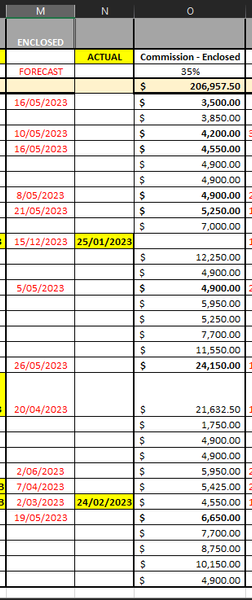
Hey experts, Looking for some help with a date issue in my formulas. What we're looking to do is find all the dates in column M, then SUM the corresponding $ amounts in Column O. So, if the...

mtarler
Apr 10, 2023Silver Contributor
how about using SUMIFS like this:
=SUMIFS(O5:O34,M5:M34,">=5/1/2023",M5:M34,"<6/1/2023")
and you could make those dates 'dynamic' based on the location of the formula and what column or row or whatever it is in (i.e. what month it should be adding up)
=SUMIFS(O5:O34,M5:M34,">=5/1/2023",M5:M34,"<6/1/2023")
and you could make those dates 'dynamic' based on the location of the formula and what column or row or whatever it is in (i.e. what month it should be adding up)
 Hamish1992Apr 10, 2023Copper Contributor
Hi mtarler
Looks like that worked, I did have to tweak it slightly but changing it to "<=31/5/2023" (I'm in Aus so the dates needed to be adjusted a touch) but this is adding stuff and isn't calculating blank cells. Thanks!