Forum Discussion

Date.Adddays in PQ
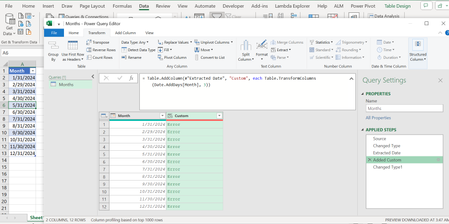
- Apr 21, 2024
anupambit1797 See attached.

anupambit1797 See attached.

ThanksRiny_van_Eekelen , is it possible to use 2(or more) functions in the same step?
example, if I want to understand the output of say 1st 3 of the below functions then what shall be the command?
Need to write the below 1st 3 functions in a single line to get the output table of each command side by side.
Thanks in Advance,
Br,
Anupam
- Riny_van_EekelenApr 22, 2024Platinum Contributor
anupambit1797 Sorry, but I don't understand! Your initial question was how to add a column based on another column by adding 3 days.
Now you also refer to the functions that add months and quarters and you want them all-in-on.
what are your intentions?
- anupambit1797Apr 22, 2024Steel Contributor
HiRiny_van_Eekelen , I want to learn on how to use the functions in practical, and don't want additional steps for each of them.
Br,
Anupam
- Riny_van_EekelenApr 22, 2024Platinum Contributor
anupambit1797 Well, if it's about learning writing M-code with the least possible number of applied steps, you start by applying each of the steps separately. Then open the Advanced Editor and 'join' the steps together into one.
For example:
Step1 = Table.AddColumn(PreviousStep, "Custom", each Date.AddDays([Month], 3)),
Step2 = Table.AddColumn(Step1, "Custom1", each .......................) ,
You could join these into one:
Step = Table.AddColumn(
Table.AddColumn(
PreviousStep, "Custom", each Date.AddDays([Month], 3)
),
"Custom1", each .......................
) ,
Not sure though that this is really helpful as it makes the code more difficult to read and maintain. your choice. Good luck!