Forum Discussion

anupambit1797
Mar 11, 2026Steel Contributor
Data Formatting
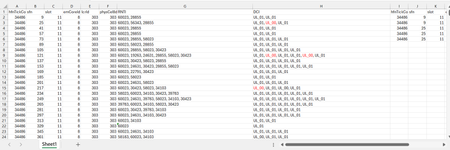
Dear Experts, I have a Data like below :- Each row can have 1 or more RNTIs( seperated by ",") and their DCI( UL_01 or UL_00), I want to put them in a format like in Col - I~P...
 Mar 11, 2026
An alternative could be Power Query which works in Excel versions starting from Excel 2010. In the attached file you can add data to the blue dynamic table. Then you can click in any cell of the green table and right-click with the mouse and select refresh to update the green result table.
Thanks a lot PeterBartholomew1 for providing the sample data in an Excel file and for the 365 solution.

IlirU
Mar 12, 2026Iron Contributor
Solution by formula (if you want it).
Apply below formula in cell J1:
=LET(
 d, A1:H24,
 t, DROP(d, 1),
tk, TAKE(TAKE(t,, -2),, 1),
    VSTACK(TAKE(d, 1),
    HSTACK(--WRAPROWS(TOCOL(TEXTSPLIT(ARRAYTOTEXT(REPT(BYROW(DROP(t,, -2) & ", ",
    ARRAYTOTEXT), BYROW(tk, LAMBDA(a, COUNTA(TEXTSPLIT(a, ",")))))), ", ",, TRUE), 3), 6),
  --TOCOL(TEXTSPLIT(TEXTJOIN(";",, tk), ",", ";"), 3),
    TOCOL(TEXTSPLIT(TEXTJOIN(";",, TAKE(t,, -1)), ",", ";"), 3)))
)
Hope this helps.
IlirU