Forum Discussion

data analysis
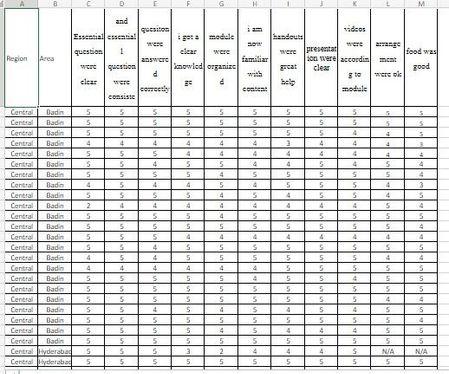

no need for trainee name or photo just the area name needed and against that how many 5, 4, 3, 2 and 1 again each aspect.

I understand. Each row is a different trainee.
Unpivot the columns C:M. The resulting table can be analysed in any way you want.
- Najam_AhmedAug 24, 2023Copper Contributoryes, each row is a different trainee but for some reason name are no shown. Bu how can I unpivot the the columns you mentioned.
- Detlef_LewinAug 24, 2023Silver Contributor
Bringing in my secret contact again:
To unpivot columns C:M in Excel, you can use the Power Query feature. Here are the steps:
Select your data and convert it into a table by going to the “Insert” tab and clicking on “Table”.
With the table selected, go to the “Data” tab and click on “From Table/Range” in the “Get & Transform Data” group. This will open the Power Query Editor.
In the Power Query Editor, select the columns you want to keep static. In your case, if columns A and B are not part of the unpivot operation, select these columns.
After selecting the static columns, go to the “Transform” tab and click on “Unpivot Columns” > “Unpivot Other Columns”. This will unpivot all columns other than the ones selected.
Click on “Close & Load” in the “Home” tab to load the unpivoted data back into Excel.
Please note that Power Query is available in Excel 2010 or later versions1. If you’re using an older version of Excel, you might need to use a different method.
There are also video tutorials available that can guide you through this process435.
- Najam_AhmedAug 24, 2023Copper Contributorsorry, that is not helping to get the desired result.